@font-face gotchas
Over the past few months, I've collected a few worthwhile notes on @font-face that are worth reading over if you geek out about this stuff…
- in Webkit (Chrome/Safari), applying
font-weight:boldto faux-bold some @font-face'd text will not succeed. Same applies forfont-style:italic. You can fix by adding the following to your @font-face declaration: (via doctype, crbug/31883, crbug/35739, webk.it/34147)
font-weight:normal; font-style:normal; font-variant:normal; /* these values are defaults in FF/Opera/IE but not webkit */
- FF/Linux cannot serve webfonts from the file:// protocol. (Also, a tome on type quality with linux from Evan Martin)
- TrueType format renders with a better quality than Opentype CFF. (sez Typekit) (fontsquirrel default)
- In IE6-8, using
createStyleSheetand then settingstyleElem.styleSheet.cssTextto a text value that includes a @font-face declaration going into will crash IE6-8. (src) font-size-adjust(only supported in Firefox) normalizes x-height and may improve the FOUT.text-transformdoesn't play well with @font-face in current implementations. (via snook & Gary Jones)- @font-face doesnt play nice with css transitions. (via ethan marcotte)
- IE6 under High Security settings will pop a security dialog when a site tries to use @font-face. (via Wouter Bos)
- There have been reports that when a font is segmented into multiple files, a css
text-shadowcan overlap in a weird way. (pics plz? :) - Aaron James Young dug into @font-face on obscure linux-only browsers.
- If a @font-face declaration is within a media query
@media screen { ..., it will fail in Firefox. (Thx Ben Kulbertis) http://bugzil.la/567573 - Hosting the fonts on a different domain? Firefox requires some extra effort; you'll need to add the
Access-Control-Allow-Originheader, whitelisting the domain you're pulling the asset from. Example .htaccess config here. Alternatively, you can use the base64 encoding in CSS (create it with the fontsquirrel generator) to avoid setting headers. details here - SVG Fonts - Currently SVG is the only way to get webfonts working on iPhone and iPad. It is the most rudimentary format for fonts on the web.
- SVG Fonts lack kerning and other complementary information
- SVGz is a format that bakes compression right in and will save you bandwidth overhead. But you'll need to add this to to your .htaccess for this benefit.
AddType image/svg+xml svg svgz AddEncoding gzip svgz(via @fontsquirrel) - SVG fonts don't work with a cache manifest. Due to the manifest treating # as comments and Mobile Safari requiring the font ID reference in the URL. [Unverified] (via Tristan Dunn)
- Using
text-overflow: ellipsis;turned the contents into only "…" and nothing else. (via Tristan Dunn) - Letter-spacing css doesnt appear to work with SVG fonts.
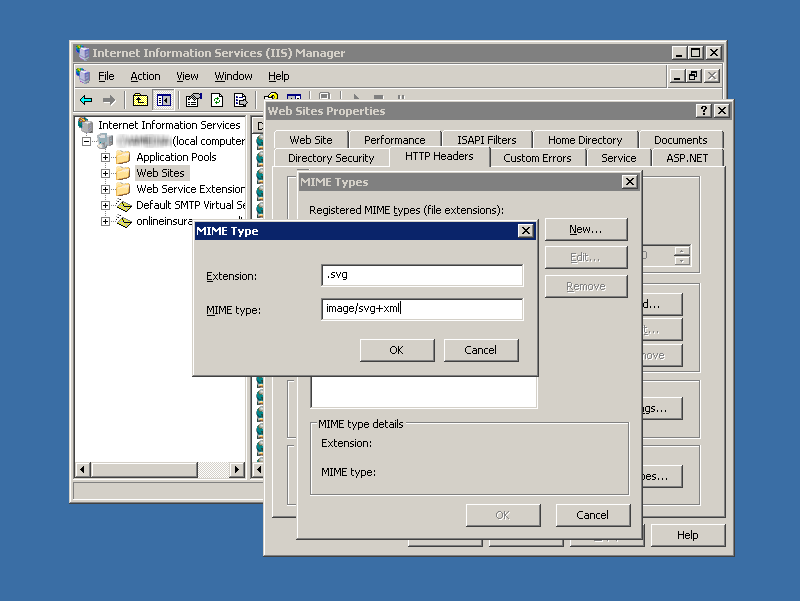
IIS Needs some custom mimetype configuration for serving webfonts. To enable, go to: Default Web Site > Properties > HTTP Headers > File Types > New Type…
- .otf :
font/otf - .svg :
image/svg+xml
(thx ProtectedVoid & Tom Nelson) — Test page
- .otf :
@font-face links that might have sneaked past you
- @font-face internationalization tests from the W3C
- Kernest open-sourced its font server, Fontue
- Bert Bos gave the full history of webfonts at SXSW
And.. regarding @font-face syntax
I now recommend the bulletproof smiley variation over the original bulletproof syntax.
@font-face { font-family: 'Graublau Web'; src: url('GraublauWeb.eot'); src: local('?'), url('GraublauWeb.woff') format('woff'), url('GraublauWeb.ttf') format('truetype'); }
From the bulletproof post:
Yes, it's a smiley face. The OpenType spec indicates any two-byte unicode characters won't work in a font name on Mac at all, so that lessens the likelihood that someone actually released a font with such a name.
There are a few reasons why smiley is a better solution:
- Webkit+Font Management software can mess up local references, like turning glyphs into A blocks. (crbug.com/33173)
- On OS X, Font Management software may alter system settings to show a dialog when trying to access a local() font that's accessible outside of Library/Fonts. More detail on my bulletproof post. (crbug.com/29729) Font Explorer X is also known to mess up other stuff in Firefox: bugzil.la/531771
- Although it's unlikely, you could reference a local() font which is completely different than what you think it is. (Typophile post on different fonts, same name) At the very least its a risk, and you're ceding control of the type to both the browser and host machine. This risk may not be worth the benefit of avoiding the font download.
These are all pretty edge case issues, but it's worth considering. FontSquirrel has already made the smiley syntax the new default in the Generator, and you should use it going forward as well.
2010.05.13: Added segmented font/text-shadow issue.
2010.05.17: Link to linux @font-face research
2010.05.22: Media Queries firefox failure added.
2010.05.29: Cross-domain tricks added. SVGz trick added
2010.07.06: Added a bunch around SVG fonts
Follow me on twitter: @paul_irish
Rad post/reference! Thanks for putting this together, Paul!!
Excellent, thank you!
I didn't know about the smileyface. Thanks :)
You may already know this? if not you you might want to test and add my recent font-face discovery:
I noticed that in IE 7+ you get can get better font aliasing of @font-face typefaces sometimes by disabling clear type (depends on the font, its size and its weight I think). From what I understand the simplest way to do that is to apply a filter to the body element like so:
body {
-ms-filter:"progid:DXImageTransform.Microsoft.Alpha(opacity=99)";
filter:progid:DXImageTransform.Microsoft.Alpha(opacity=99);
}
This is applying a pretty much non-noticeable opacity but doing so disabled the browser clear-type and reverting the default OS aliasing (not sure why they are different but they are)
If for some reason you want the clear-type back on individual elements simple add filter:none; for example:
h1.foo { filter: none; }
I'm not sure of performance issues with this, I imagine if you have heavy JS going on it could be impacted. I'd also recommend putting in a conditional stylesheet.
awesome stuff, thanks for this. Read into it again last week, mainly Snook's awesome post on it. I wasted too much time messing with fonts instead of getting backend stuff done. ah well! :D
Very detailed research, as always.
On a side note: your site lags on Linux+Firefox because of the huge background canvas drawing. Scrolling is often painful.
I'm doing a lot with @font-face now, and your posts have been a great reference. Thanks!
Great roundup as usual Paul. I've definitely been running into the "A" blocks in Chrome on sites not using the bulletproof smiley syntax.
I'm also starting to wonder how we're going to navigate things when IE ships support for WOFF. How will we make sure that IE loads the WOFF and not the EOT? Will it matter? In any case, it'll be a good problem to have to solve. Here's hoping it actually happens in IE9…
Nice list, thanks.
I miss one 'gotcha': Although IE6 is not that important anymore, it has some serious issues with @font-face when the security is set high. The IE6-user will see a security warning popup on every page on the website.
Hey Paul. Great post. Don't know how you keep track of it all.
Glad you finally came around to the "unlikely fontname" solution with smiley face.
I knew it was just a matter of time. :-)
Rich
@Richard, :) indeed. I still think the duplicate name thing is super edge case, but the font management woes were just too significant. Mo' Bulletproofer ftw.
@Wouter, whoa. had no idea. I added it here, thanks!
@Matt Wiebe, Aye. I hope msft pays attention to this syntax and makes it grab the woff if available. No guarantees.
@Paul: Yah i should post about that cleartype hack and the text-shadow approach. Good call.
>I still think the duplicate name thing is super edge case, but the font
>management woes were just too significant. Mo' Bulletproofer ftw.
Bottom line: except as a hack for preventing unnecessary http requests by IE, the local() descriptor isn't very useful because, in the absence of a unique font identifier, the only thing you can absolutely trust is what's on your web server. All these bugs crawl out of the same crack.
Want to have some fun? Take an odd-looking font and rename it "inherit". Then install it. After that, it will just be a matter of time before it pops up on one web page or another as you browse.
User agents have not been careful about distinguishing between the fallback font-family names that are keywords and therefore must not be in quotations, and fonts named "serif, sans-serif, cursive" etc. that must be because their names match a keyword font-family.
Oops!
love the smiley; I'm using on my blog. FYI - possibly the best open type on the web for @font-face : http://www.theleagueofmoveabletype.com/
Hi Paul,
I’ve used the Font Squirrel generator today (with the default settings) and implemented it in my website:
http://preview5.mcw.nl/
At first it seems to work fine. Firefox renders the text as it should. Internet Explorer sometimes renders the text correctly but sometimes it doesn’t. After a refresh in IE the text is rendered as it should. Can you indicate if this is a known problem, if I’m doing something wrong or maybe point out the problem and a possible workaround?
Thanks for your reply.
Martijn van Mechelen
Something important I just found after hours of slaving that is really important:
@font-face declarations do not work in Firefox or IE when they are wrapped in a @media declaration. They do however work in webkit based browsers.
I spent hours trying to figure this out and finally found a thread on Stack Overflow where someone discovered this. Moving the @font-face declaration out of the @media section seems to work just fine. I hope this makes the list, it would have saved me and I'm sure countless others headaches.
@Ben Kulbertis
Man that's a great one, thanks Ben. Can someone file that as a bug on the mozilla bugzilla?
@Paul Irish
I will get on that, thanks for the mention by the way!
Getting each browser AND its "font system" to all work together nicely? I don't want to even think about it since fonts always seem to be the "doesn't work so well cross platform even though we've had twenty years of this". Took me a bit to find since it looks like the OSX Chromium nightlies still suffer from this.
Amazing resource and very concisely presented.
Thanks
@Paul Irish
Just wanted to do a follow-up on the bugzilla report I filed for the font-face in a media query failure in Firefox ( https://bugzilla.mozilla.org/show_bug.cgi?id=567573 ). It seems that the use of at-rules inside a @media rules are invalid in CSS2.1 which is why Firefox ignores it. It seems to me and some of the other posters on the bug that this is a good idea so it may be changed in the future. Here is where it says on w3.org that is invalid: http://www.w3.org/TR/CSS21/media.html#at-media-rule . Anyway, there you have it. We will have to see if the developers decide to change how this is handled.
Be advised that the bulletproof and bulletproof smiley methods you propose here do not work on Android phones! My User-Agent is "Mozilla/5.0 (Linux; U; Android 1.6; en-us; T-Mobile myTouch 3G Build/DMD64) AppleWebKit/528.5+ (KHTML, like Gecko) Version/3.1.2 Mobile Safari/525.20.1".
Android does support @font-face and the double declaration method works fine. It appears to be choking on the local() line, ignoring everything after local.
@Martijn
I'm having the exact same problem at work. Could it be some IIS setting?
Maybe a missing mime type or cache-header setting that is messing up IE?
As Martijn noticed, if you refresh the page, the font renders correct…
@Lesley
At work the problem seems related to a frameset. Anyone any ideas?
"If a @font-face declaration is within a media query @media screen { …, it will fail in Firefox. (Thx Ben Kulbertis) http://bugzil.la/567573"
Thank you so much! Four hours of pulling hair and search the Net before finding this. Problem solved!
NOTE: This page bookmarked has been bookmarked for future frustation solving.
might be a dumb question but how do i type the smiley face in a text editor?
@John Heh. good question. I normally come back to this post and then copy paste. You can also google `unicode smiley` and copypaste from there. :p
hi paul, great blog!
I am experiencing a delay when implementing @font face. Is this normal? Am I doing anything wrong?
Couple of issues I've ran into with SVG on the iPhone recently:
SVG fonts don't work with a cache manifest. Due to the manifest treating # as comments and Mobile Safari requiring the font ID reference in the URL.
In my tests using
text-overflow: ellipsis;turned the contents into only "…" and nothing else.@Tristan Dunn
Nice! thank you. Add to that svg fonts dont work reliably with letter-spacing.
Tristan, I added your notes into the article.. I'm curious if you leave off the hash in the manifest but then use it in the CSS if it'll work…
Regarding Paul's question of leaving off the hash in the manifest but using it in the CSS: That makes logical sense but attempting it still fails. I don't think it fails because the hash is interpreted as a comment (the spec is really clear that a comment must appear on its own line), but - alas - the bug *is* real.
I came eventually to this treasure-trove of information while trying to get @font-face working in Firefox 3.6.6 on OS X.
I generated a font-face kit for Diavlo using Font Squirrel. Tossing the file demo.html at Firefox fails to render the font; I did notice after the fact that you mention that Firefox doesn't do right when using file:// . So I put the Squirrel's kit at the docroot of the local Apache server — still no Diavlo, just the default font.
Your test file http://dl.dropbox.com/u/39519/webfontsdemo/index.html also fails in Firefox. The default font is used in every test case.
Any idea what could be going on? I tried disabling all Firefox plugins in case something was interfering; no change.
Just wanted to confirm Tristan's "text-overflow:ellipsis" find as well. It really does truncate the entire string to ellipsis. Reverting to a non-SVG font fixes it.
Tristan, Paul: Have you filed a bug at Apple regarding these SVG font problems?
Been testing on an HTC Desire (Android 2.1). As suggested earlier, 'local' stops it loading anything. Without local it'll load the ttf, but doesn't use it (tried base64 also).
Couldn't get android to eat the SVG file either.
In IE6-8, using createStyleSheet and then setting styleElem.styleSheet.cssText to a text value that includes a @font-face declaration going into will crash IE6-8.
John, I'm wondering if you know of any workaround for this, or is it just impossible to dynamically insert @font-face declarations in IE6-8? Thanks in advance!
@Nathan Rajlich
nathan,
diego perini found a way to avoid the crash
its in the top of the code here.
http://javascript.nwbox.com/CSSSupport/css-support.js
good luck
Adding this to my gedit snippets, thanks!
Can anybody tell me how to integrate differenet fonts in the website which will work, if the sytem donot have th eparticular font type.
@Dave Myron Thanks for the confirmation. I have not filed bugs yet.
Also worth noting that users who are on Win XP will not get anti-aliasing in IE6 or any version of FF. It's a pain. My best solution is to detect the OS version, and use Cufón (when allowed by the font) for those users, and use font-face for the rest.
We use a program called tealeaf at my workplace to track user interaction and see the problems clients are having in order to fix them more easily. We wanted to test an embedded font using @font-face so I implemented the bulletproof syntax with the smiley. Everything worked great and it went into production. In tealeaf, you can see a record of "viewable pages" that the user has visited during their session. We started noticing a number of IE7 users with the non-ie font files loading as "viewable pages." We aren't really sure if the user is impacted in any way by this or if the files are actually downloading to the user. Ever heard or seen anything like this?
@Dave Myron
I have a working proof of the svg files not behaving properly in the cache manifest. If you include the font name normally you will have it be downloaded, but @fontface is still looking for the url:'fontfilename#fontid' so it fails.
if someone knows of a way to get the font file to download and then the identifier be added afterwards within the @fontface statement, that may work.
http://straathof.acadnet.ca/pinch/
This is for an opensource publishing engine, and I need a solution… http://straathof.acadnet.ca/beta2.5.5/
Everyone commenting here is a Genius! Thank you all for your tremendously helpful knowledge.
:-)
One week into CSS and full of dumb questions: After much experimentation, I take it that @font-face cannot be used within the property declarations of ID or CLASS statements? [I hope I'm using the terms correctly; feel free to correct].
My objective is to have one or more links on the page in a non-standard font, leaving the other links in the default font.
Thanks for any guidance.
If you really need letter-spacing with a SVG font on iOS (on iPad-Pod'n'Phone) here's a little workaround in jQuery. I have to admit, it's rather ugly … but works.