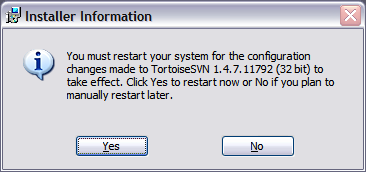
You must restart your system

In the 10 years that I've seen dialogs like these, I've always clicked "No" or "Restart Later" and the software ALWAYS works. The software installs indicate it's mandatory, but never is it functionally mandatory. Not TortoiseSVN, ISO mounting utilities, not even Microsoft Office; it always works without a reboot.
So why is this pattern so widely adopted?
It actually is mandatory.
According to Windows file locking semantics, a file in use cannot be modified or overwritten. Tortoise installs a shell extension to Windows Explorer which displays a special context menu, and that extension is a DLL file that is always loaded by Explorer. When the Tortoise installer attempts to overwrite this DLL with a newer version, it cannot (as the file is in use by Explorer) so it adds this file to a list of files to be overwritten on the next reboot, and prompts you to reboot at the end of the installation process.
You may not suffer any ill effects from not rebooting (the old shell extension DLL may work just fine for you, and still work with the new version of Tortoise you just installed), but a reboot is still necessary to complete the installation.
POSIX/UNIX file locking semantics are completely different – you can overwrite/change files in use. Next time the file is read, the new version if used, but for processes that are already running, the old one is used until the file handle is closed. Also, UNIX has a long tradition of having a "reload" command implemented, which causes the application to reload settings and other dependencies without restarting, so Tortoise on a POSIX system (like OS X or Linux) would simply overwrite the file, and ask the process which uses that file to reload, and never need to reboot. Rebooting has traditionally been completely unacceptable on UNIX, so they've got this stuff figured out… and that's why Windows is the only OS that requires users to reboot all the time.
I guess your and my definitions of 'mandatory' are different. I would expect 'mandatory' would mean I can't run the application until a restart has completed. That is obviously not the case, I'll just lose out on some eye-candy until next reboot.
@Paul Irish
You can also end up with instability, missing features, corrupted data, etc :-)
Imagine you upgraded to a new version that changed file formats. If you don't reboot, some components will be using the old file format, and others the new one. That could lead to crashes, or incorrect data being shown to the user. If there are components that perform writes, you could end up with data loss.
@Paul Irish
You were just lucky. It can happen: suppose only some of the files (including, for example, the main EXE) could be updated, while others were in use and therefore could not be updated (core DLLs, which might have been in-use because of a browser plugin, for example). Suppose further that the new EXE is not able to run with the old DLLs: they might use totally incompatible ABIs, or perhaps the new app just depends on new exports. It doesn't take a genius (merely a geek) to see that this is a recipe for not working.
Alternatively, suppose that the user actually wanted to *use* the new version of whichever file(s) could not be updated: for example, I have known (older versions of) at least one "Tortoise" shell extension to not unload any already-installed version of the extension before attempting to replace it; if the reason you updated was because you wanted to use the new version, you would probably have to at least log out (barring devious tricks to unload the extension manually and then somehow trigger the replacement early). (I can't remember if this actually made it not work, or if I wanted some new feature, but it must have been one of the two or why would I have bothered to do it?)
@Craig too
However, it *is* true that the message does seam to be somewhat misleading nowadays, as hinted in passing above: it seems that it is usually possible to merely log off and then log on again. Presumably, things are a bit more complicated with services, since they obviously persist between log-on sessions, but it is likely possible in many cases to trigger the update by stopping the service, logging off-and-on-again, then starting it again.
Also, in many cases, the file that couldn't be updated didn't really need updating in the first place, but just happened to be a slightly newer version. Maybe it was just a newer version of a library with added entry points which happened to get bundled with the installer in question for no particular reason except that it was what was on hand. Maybe it actually adds new user-visible features. Or maybe it fixes an often-critical security vulnerability in the library when used for certain applications. Regardless, it is really up to the system owner to define what is "needed" — though some definitions would obviously lead to the applications in question not working (which is sometimes actually desirable ;-).
And it would, honestly, be really stupid to change the file formats for anything but static application data in such an incompatible way between releases like that. (Of course, maybe you did mean static application data, in which case you are right.)
But really, in the end, I can't help but wonder why MS didn't define their FS semantics in a way that made it possible to replace the existing versions *without* disturbing running programs (with the obvious exceptions regarding attempts to dynamically load DLLs that have been upgraded to incompatible versions out from under you — but there are probably other ways this can fail unexpectedly).
I'm with Paul….
I've chosen not to reboot at least once for every application I install/use, and never I had a single problem because of that.
The only thing that really messed up everything was one time right after installing Windows 98 I decided to install Office, Photoshop, Corel Draw, Winzip and everything else before the next reboot….
that didn't work out.
Sometimes I would not do restart it immediately wait later.
I have been preaching this for years! The only program I have ever actually needed to restart for was Alcohol 120%. But PowerISO, Daemon, and other (better) tools of the same nature do not require a reboot to work, so I consider that an issue with Alcohol. One of the worst Windows application conventions to be sure. Okay… maybe not one of the worst, but it's the little things that add up.
~Ross
Raymond Chen explains this "issue" pretty well:
http://technet.microsoft.com/en-us/magazine/2008.11.windowsconfidential.aspx