Home > javascript > requestAnimationFrame for smart animating

requestAnimationFrame for smart animating

February 22nd, 2011

If you've never written code to animate inside the browser, you can stop reading :)

What is requestAnimationFrame?

In your animation work, you've used a timer loop to make changes every few milliseconds. Good for us: browser vendors have decided, "hey, why don't we just give you an API for that, because we can probably optimize some things for you." So it's basic API for use with animation, whether that be DOM-based styling changes, canvas or WebGL.

Why should I use it?

The browser can optimize concurrent animations together into a single reflow and repaint cycle, leading to higher fidelity animation. For example, JS-based animations synchronized with CSS transitions or SVG SMIL. Plus, if you're running the animation loop in a tab that's not visible, the browser won't keep it running, which means less CPU, GPU, and memory usage, leading to much longer battery life.

OMG I can brag about having a site with battery-friendly animations?

Yeah bro. Totes McGoats.

How should I use this?

 
    // shim layer with setTimeout fallback
    window.requestAnimFrame = (function(){
      return  window.requestAnimationFrame       || 
              window.webkitRequestAnimationFrame || 
              window.mozRequestAnimationFrame    || 
              window.oRequestAnimationFrame      || 
              window.msRequestAnimationFrame     || 
              function( callback ){
                window.setTimeout(callback, 1000 / 60);
              };
    })();
 
 
    // usage: 
    // instead of setInterval(render, 16) ....
 
    (function animloop(){
      requestAnimFrame(animloop);
      render();
    })();
    // place the rAF *before* the render() to assure as close to 
    // 60fps with the setTimeout fallback.

Note: I am using 'requestAnimFrame` here because since the spec is still in flux, I don't want to make a straight polyfill, yet.

2012.01.07: The spec has gotten some fixes and settled down. We're also seeing ms and o implementations, so we're ready for a polyfill now!

A robust polyfill

Opera engineer Erik Möller wrote about rAF and developed a polyfill that better handles browsers without native support. You can read about it, but basically his code will choose a delay of between 4ms and 16ms in order to more closely match 60fps. Here it is, in case you'd like to use it. Note it uses the standard method name. I have also fixed the cancel* method's name, as it has changed in WebKit.

(function() {
    var lastTime = 0;
    var vendors = ['ms', 'moz', 'webkit', 'o'];
    for(var x = 0; x < vendors.length && !window.requestAnimationFrame; ++x) {
        window.requestAnimationFrame = window[vendors[x]+'RequestAnimationFrame'];
        window.cancelAnimationFrame = 
          window[vendors[x]+'CancelAnimationFrame'] || window[vendors[x]+'CancelRequestAnimationFrame'];
    }
 
    if (!window.requestAnimationFrame)
        window.requestAnimationFrame = function(callback, element) {
            var currTime = new Date().getTime();
            var timeToCall = Math.max(0, 16 - (currTime - lastTime));
            var id = window.setTimeout(function() { callback(currTime + timeToCall); }, 
              timeToCall);
            lastTime = currTime + timeToCall;
            return id;
        };
 
    if (!window.cancelAnimationFrame)
        window.cancelAnimationFrame = function(id) {
            clearTimeout(id);
        };
}());

I have this polyfill available as a gist as well.

Let's see that in action

The requestAnimationFrame API

window.requestAnimationFrame(function(/* time */ time){
	// time ~= +new Date // the unix time
});

The callback is passed the current time as the first argument, as you'll likely want that.

You'll also notice the second parameter to requestAnimFrame: the element that visually bounds the entire animation. For canvas and WebGL, this will be the actual <canvas> element. For DOM stuff, you can leave it off or define it for a slightly more optimized experience.It's since been removed from the spec (and WebKit's implementation)

Is it ready?

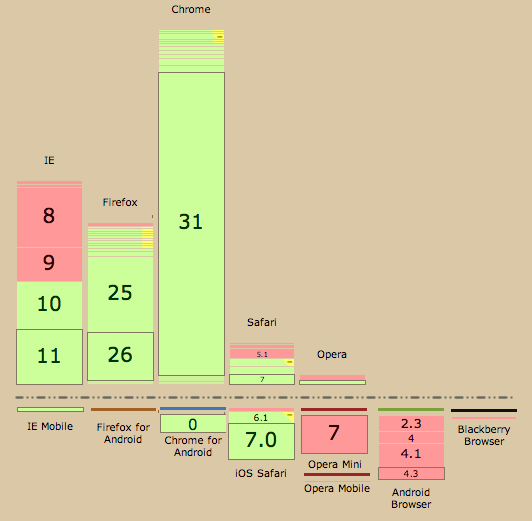
Right now, the Webkit implementation (available in Nightly Safari and Chrome Dev Channel) and the Mozilla one (available in FF4) differ slightly. Mozilla's has a bug which caps potential framerates at about 30fps.Actually, "It's currently capped at 1000/(16 + N) fps, where N is the number of ms it takes your callback to execute. If your callback takes 1000ms to execute, then it's capped at under 1fps. If your callback takes 1ms to execute, you get about 60fps." (thx, Boris) It'll be fixed though, probably for the next release after FF4 ships. Also Chrome 10 doesn't have the time parameter (added in m11), FF currently ignores the element argument.

We want your feedback!

If you do animation work, WebKit and Gecko hackers would love to hear if this meets your needs or if it could be improved any. Take a look at the draft requestAnimationFrame spec. It's currently modeled like setTimeout; does a setInterval repeating style API make more sense? Does this API have downsides when animating multiple simultaneous elements? Does the element reference work for you? In general, does this solve the common cases of animation?

Resources for hackers

Thx @mrdoob for bringing this up today and spreading the good word.

2011.06.01: Joe Lambert took this idea and provided shims for both setTimeout and setInterval that leverage this. http://blog.joelambert.co.uk/2011/06/01/a-better-settimeoutsetinterval/

2011.10.13: Updated code sample and explained why the rAF call before render makes sense due to the timeout fallback.

2011.12.14: Updated code sample and text. Removed references to element argument, as it was removed from spec and webkit's impl.

2012.01.01: Added polyfill from Erik Moller.
2012.01.05: Addressed polyfill fix from Tino Zijdel of DHTML Lemmings fame. :)

Paul Irish javascript

  1. February 22nd, 2011 at 15:58 #1

    The shim function should also pass in a the current time to the callback. Somebody should write that.. :)

    Edit: I took a first pass at it: https://gist.github.com/839879 It handles the fact that time wasn't passed in in chrome 10, too. Untested.

  2. SalmanAbbas007
    February 22nd, 2011 at 16:03 #2

    OMG thats damn cool :D

  3. February 22nd, 2011 at 16:36 #3

    The time should not be in the spec nor passed to the callback. It has no point and won't work across browser according to the people implementing requestAnimationFrame.

  4. February 22nd, 2011 at 16:37 #4

    Why wrap it in function?

    window.requestAnimFrame =   window.requestAnimationFrame       || 
                  window.webkitRequestAnimationFrame || 
                  window.mozRequestAnimationFrame    || 
                  window.oRequestAnimationFrame      || 
                  window.msRequestAnimationFrame     || 
                  function(/* function */ callback, /* DOMElement */ element){
                    window.setTimeout(callback, 16);
                  };
  5. February 22nd, 2011 at 16:41 #5

    @Dmitry

    Doesnt seem to work.. kangax was questioning that earlier too http://paulirish.com/i/9290.png

  6. February 22nd, 2011 at 16:53 #6

    If you just want to pass the time the setTimeout was called, that's easy:

    function(/* function */ callback, /* DOMElement */ element){
      window.setTimeout(callback, 1000 / 60, +new Date);
    };

    I believe that works in all browsers that Microsft didn't make… not sure if IE9 gets that one correct. If you want the time the callback was called (Date.now), you'll need to wrap the callback for that.

  7. February 22nd, 2011 at 16:54 #7

    For The Win. Awesome post Paul!

  8. February 22nd, 2011 at 16:58 #8

    It's not too intuitive, but works for me. As long as gman is happy I'm happy.

    Hmmm.. an alternative could be… setAnimationInterval( loop );

  9. February 22nd, 2011 at 17:28 #9

    Paul, any idea when Chrome will support clearAnimationFrame? I'm looking at adding requestAnimationFrame support into scripty2, but without its counterpart the implementation is rather hacky.

  10. February 22nd, 2011 at 17:37 #10

    @Andrew Dupont

    It's actually implemented as webkitCancelRequestAnimationFrame (and has been since day 1 of rAF). Whoops, though.

    James is gonna update the spec with 'cancel', instead of 'clear'. Dig?

  11. February 22nd, 2011 at 18:07 #11

    @Paul Irish Can’t see how wrapping in a function could solve context problem. Works for me without wrap.

  12. Boris
    February 22nd, 2011 at 19:22 #12

    Paul, you misread the mozilla bug. mozRequestAnimationFrame is not capped at 30fps. It's currently capped at 1000/(16 + N) fps, where N is the number of ms it takes your callback to execute. If your callback takes 1000ms to execute, then it's capped at under 1fps. If your callback takes 1ms to execute, you get about 60fps. If your callback takes 16ms to execute, as the ones in that mozilla bug, you get about 30fps.

    gman, the point of the time is to allow you to sync your scripted animations with the declarative ones the browser is running. That seems like a desirable thing to do; why would you not want to do that?

  13. February 22nd, 2011 at 21:23 #13

    Awesome stuff for framework developers… hey, you know who you are guys!

  14. February 22nd, 2011 at 21:23 #14

    @Paul Irish add return to your fallback function, so that it could be cancelled later.

  15. February 22nd, 2011 at 22:35 #15

    @Boris Thanks for clarifying on that. I've updated the post.

  16. simono
    February 23rd, 2011 at 00:53 #16

    @Boris
    right, and the 60hz cap is intentional. most displays (DVI) can't refresh faster, so no point in re-drawing aster.

  17. Jared
    February 23rd, 2011 at 01:59 #17

    Totes!

  18. Jeffrey Gilbert
    February 23rd, 2011 at 08:23 #18

    Does canvas really require you to redraw the entire stage each frame? Why not create the fills once and animate them as sprites around it? Maybe that's just my flash mind making sense of a canvas world.

  19. Boris
    February 23rd, 2011 at 08:57 #19

    Jeffrey, what you're describing is how SVG would work, say. Canvas is immediate-mode, so you have to redraw any changed areas (e.g. the old and new locations of every sprite that moves).

  20. February 23rd, 2011 at 12:56 #20

    Great one, we will test it in our in-development canvas app framework and see how it fits in – though I can see already that it will fit nicely, all right!

    Do you know if it syncs with the screen refresh rate if running at 60fps or do we still need to push more fps to get the max fludity of action?

  21. February 23rd, 2011 at 17:05 #21

    There is some init code for webgl on khronos website https://cvs.khronos.org/svn/repos/registry/trunk/public/webgl/sdk/demos/common/webgl-utils.js
    Should be in osg.js really soon

  22. February 24th, 2011 at 01:50 #22

    @Tom Tu

    I've implemented this technique and got mixed feelings – let's assume this little case study – i have a little application in canvas that draws Spirographs. Before using this technique I was using one setInterval loop which called update and render methods every loop so the drawing was linked with updates. There are two drawing modes – one which doesn't use clearRect and just draws extra lines on the graph to draw the spirograph and the other where spirograph is drawn on a buffer and math model representation of the drawing process is overlaid over the spirograph copied from buffer (buffer doesn't use clear as in the first mode).

    if somebody wants to test it its here at http://provoke.it/einie/labs/d01.html / press preview drawing process for mode 2

    Tests on Chrome dev 11.0.672.2 Mac OSX

    the performance before:
    mode 1: ~225fps – very stable mode 2: ~177-183fps

    now after the change to put rendering to be handled by requestAnimFrame and keeping my update method running on old timer with setInterval with 1ms update to get the max updates depending on browser I'm getting way smaller improvement then I've expected. So it either draw more often then the screen refresh – which would be wasteful or there is some significant overhead involved in this technique if the fps is down from ~180 to 60fps and the gain is this small.

    (note after change fps = updates/s rather then fps)
    results after change: mode1 ~230-233fps – but sudden drop downs from time to time even to 60fps but its not even noticable outside of the updates counter (i take it sometimes needs to wait to sync with drawing?) and mode2 in mode2: ~190-210fps – which would be great if not the fact it drops sometimes down to 120-150fps for quite a while and I even dare to say that it is this way way more then the first 10-15% improvement so question is – where from comes this instability?

    I confirm that as before running two instances of the same test on diff tabs caused performance hit on the active one now the performance hit is gone – so this is great. Although question stands – How often does it draw? Can we control how often it draws? If it isn't synced with the screen refresh I believe we should be able to set the ~frequency at which the update should happen so we don't hammer the CPU with unnecessary amount of renders.

    total system CPU load though is down from 72-75% before using this technique to 49-51% !!! which is damn great.

  23. Boris
    February 24th, 2011 at 06:11 #23

    @Tom Tu
    Tom the point is that the drawing frequency is chosen by the browser. At the moment that frequency is about 60fps for visible tabs and something else for background ones (what exactly depends on browser), but in the future it might depend on load, battery state, etc.

    You can't control how often it draws. That's the whole point.

    In Gecko, the firing of the callback is synced with layout and restyle processing, and in upcoming releases will also be synced with screen updates. And yes, the idea is to not do updates that won't be painted anyway.

    I'm not sure what sort of improvement you were looking for that you're not getting: the reduced CPU usage is the main improvement to look for!

  24. February 24th, 2011 at 09:10 #24

    Any news about animationStartTime? It plays well with requestAnimationFrame. That way the browser doesn't have to garbage collect Date instances all the time when you're doing +new Date.

  25. February 25th, 2011 at 00:12 #25

    @Boris
    Thanks Boris for clarification – I've read through the docs and now everything is clear. I've profiled it a bit more and can confirm that requestAnimationFrame doesn't guarantee 60fps. The test I've preformed showed that the rendering was called every ~16-33ms with tendency to stick to the extreme values as if the browser if not rendering at 60fps tried to halve it to 30fps. (tests on Chrome)

    And this is why I was bit surprised about lack of higher update cycles and better stability of the update rates if ran on separate parallel timer. Rendering takes lion's share of the CPU power so since we drop from synced 150-220 frame renders/s to 30-60fps I thought we'll see a bigger improvement.

    I agree totally that the lower CPU load is worth it, all right. I understand that the lower CPU load comes from the fact that there is less redundad renders although at the same time I'm still bit hmm disappointed that if we chose to for whatever reason to hammer down the CPU (not saying that it's good for end users… sometimes you just want to hammer something down right?) we can't use the extra freed power from the rendering… will have to reach for workers to do that I guess ;)

    Anyways I'm supporting this concept with both arms and feet – looking forward for it to hit the mobile browsers as we'd definitely could use some reduced hit on CPU – especially in environments like iOS where increased CPU load may lead to silent stop of JS execution.

  26. Boris
    February 25th, 2011 at 09:40 #26

    @Tom Tu
    Tom, I can't speak to the Chrome implementation's details, so I don't know why you see the bouncing behavior there.

    Rendering does take most of the CPU power in cases like this, but rendering happens asynchronously when changes are made to style and the DOM. So in the settimeout case you may be changing style 200 times a second, but rendering doesn't happen 200 times a second; style changes are coalesced. This is certainly true in both Gecko and Webkit. The animation frame API doesn't reduce the time from the rendering much necessarily (unless you're in a background tab), but does reduce the CPU time needed for making the actual DOM/style changes, since those now happen less often.

    Firefox 4 on mobile will be shipping with this API. That doesn't help you much for iOS, of course… ;)

  27. February 25th, 2011 at 12:12 #27

    @Boris
    Boris I'm still offended that moz passed on pushing your foxie on iOS, shame on you guys, shame! You'd definitely provoke apl to put more love to the mobile-webkit, android with their webkit would benefit as well, not to mention that you'd benefit as well with tons of users jumping to fennec all right!

    And since you can't really call operamini a competitor to webkit/fennec as their approach to mobile browser is wee diff (more like WAP2.0 then 3G full browsing experience but w/e) this leaves safari with no competition and good reasons to improve and adapt technologies at proper pace… I'm starting to feel you did this on purpose! hehe

    Anyways, I've ran some extra tests in Firefox 4b11 on OSX – and I'm afraid that number of updates/s dropped with requestAnimationFrame from ~97 to ~87-92 in mode 2 of the mentioned earlier case study. In mode 1 it's locked by the internal timer limit at 100 update/s regardless of rendering method.

    Again not much of a drop ~5-10% – don't know how it will work with more intensive drawing then this case – will have to do further tests and hope that the drop in updates doesn't scale as the complexity grows.

    In more CPU intensive mode 2 Firefox total CPU load with reqAnimFrame – ~58% down from 78% so this is on par with similar ~20% drop in CPU load as in Chrome. Good job with this one will defo help with pulling some nice stuff with Fennec (iOS guys? c'mon!)

    I have no idea how it looks like on windows – I can imagine that with hardware acceleration It could be different and speaking of this – any info/ETA on when hardware acceleration for canvas is going to hit OSX and other platforms then windows?

  28. Boris
    February 25th, 2011 at 13:31 #28

    @Tom Tu
    Tom, Apple's terms of service don't allow Firefox in the app store (it violates several of the criteria, including the fact that it ships its own JavaScript engine). I'm not sure what "pushing" we were supposed to do here. Apple is just flat out not allowing users of their system to install our software.

    I'm not sure what offends you. The fact that we didn't switch to using the built-in Webkit for Firefox on iOS? That's the only way we could have shipped our browser there given Apple's terms of service.

    > this leaves safari with no competition

    More precisely, Apple's terms of service prohibit any competition for Safari from being distributed via the app store.

    We'd love to ship an iOS version of Firefox. There have been some unofficial (and successful) attempts to make that at least compile and run. But Apple flat-out forbids distribution of such a thing, so there's not much point spending more time on it for the moment.

    If you do want to see Firefox on iOS, please complain to Apple about its restrictive policies.

    > I'm afraid that number of updates/s dropped with requestAnimationFrame
    > from ~97 to ~87-92

    That is, the number of times the interval timer, which is unrelated to the timer the updates happen off of, fires dropped? That's believable, yeah.

    > any info/ETA on when hardware acceleration for canvas is going to hit
    > OSX

    Probably soon after Apple has a sane API for doing low-level 2d acceleration. The reason this was only done on Windows so far is that Windows is the only place such an API (direct2d) exists. And even then, it's only available on some Windows versions…. (Well, more precisely you get similar behavior on Linux with Render and some drivers; canvas on Linux is often faster than canvas on OSX as a result. But this doesn't require app-side changes; just using Render and letting the X server figure out what to accelerate itself sorta works. If you get lucky.)

  29. February 25th, 2011 at 16:26 #29

    @Boris
    Just mocking you with the 'being offended' line Boris – love the stuff you guys do and just expressing my grief that can't experience it on iOS.

    I want to believe that if you'd actually made attempt to publish it on the AppStore that Apple would let it slip under the pressure of the community and to show they aren't afraid of your competition and that they'd see that having fennec as competitor can only benefit both their platform and the further push of modern web. Though I can only imagine that you can't afford to spend hours of work on it only to stumble on an apple wall if I was wrong.

    And shame to hear about the hardware rendering on mac.

    Anyways, thanks for the insight and for breaking my dreams of seeing hardware rendering on OSX soon after it'll settle on windows. Eh!

    … feeling like writing to Steve Jobs to ask him about this hehe ;)

  30. March 1st, 2011 at 04:29 #30

    "if you're running the animation loop in a tab that's not visible, the browser won't keep it running"

    What happens when you switch back to the animating tab?
    Does it continue from where it 'paused', or does it 'jump' to where it should be at that point in time?

    I can see an implied 'pause' feature causing developers quite some head aches (or joys).

  31. March 1st, 2011 at 05:10 #31

    this feature is not available in the latest Safari/WebKit nightlies. you need to get a Chrome nightly in order to test all this (or a FF4 beta).

  32. Boris
    March 1st, 2011 at 06:05 #32

    > Does it continue from where it 'paused', or does it 'jump'

    That's up to the author. They just start getting more frequent callbacks; what they render is up to them. Gecko provides the current time in the callback, so if you base your rendering on that it'll effectively 'jump' to the right place.

  33. March 7th, 2011 at 12:01 #33

    This is pretty cool. What if… instead of animations, you’re doing an AJAX call to poll a server for updates, could this be used to stop the page from polling endlessly to the server when the user is in a different tab? Does anyone do/care about this with polling stuff?

  34. Boris
    March 7th, 2011 at 14:25 #34

    Peter, you could use this as a poller, but expect browsers to throttle this _very_ aggressively in background tabs (e.g. Firefox will double the timer interval every time the timer fires in a background tab) or not call it at all. If that's what you want, of course, then this is a pretty good API for it.

  35. March 13th, 2011 at 13:41 #35

    I have improved the script by adding support for element visibility and window blur detection. Feel free to use:

    https://gist.github.com/868471

  36. Ami
    March 16th, 2011 at 06:21 #36

    hi, paul. i love this. but, can i request the javascript like for your background?

  37. March 17th, 2011 at 17:27 #37

    Very neat. I understand the other calls but what is oRequestAnimationFrame? Opera?

  38. a.
    April 3rd, 2011 at 12:34 #38

    how do I use javascript to change the border radius of an item using the style property?

    document.getElementById('div1').style.border = 'solid 1px red'

    do I write it like this
    document.getElementById('div1').style.borderRadius='solid 1px red'

    or
    document.getElementById('div1').style.border-radius='solid 1px red'

    How do I write it for mozilla and webkit which attaches a prefix to the property?

    document.getElementById('div1').style.-moz-border-radius = " "

    or
    document.getElementById('div1').style.mozBorderRadius="solid 1px black"

    I tried the above and none of it works. Do you know in general how to use javascript to set the style property for properties with dashes in the name?

    Thank You

  39. Ryan
    April 4th, 2011 at 12:29 #39

    Would anyone know how this could be implemented into the CakeJS canvas framework for performance improvements?

    http://code.google.com/p/cakejs/

  40. Casper
    April 24th, 2011 at 05:09 #40

    @a.
    To set border-radius in firefox

    document.getElementById('div1').style.mozBorderRadius = "5px"
  41. April 25th, 2011 at 10:31 #41

    I probably do this wrong way, but it doesn't speed up animations for me. Look here http://maxdegterev.name/demos/epicface/index.html VS http://maxdegterev.name/demos/epicface/slow.html

    Why oh why? Why is it so slow?

  42. April 26th, 2011 at 19:24 #42

    the demo by Louis-Rémi Babé is down.

  43. May 6th, 2011 at 18:44 #43

    So, I've used this a for a bunch of different things now, and it is a huge improvement from just using setTimout() itself in your animloop.

    There is clearly a big diff between firefox and chrome, and chrome and webkit nightly even. Webkit nightly performs extremely well, I just realized. I hadn't tested it till now, and am not surprised. Chrome 11.0.696.60 unknown (it says install new version idk) it is noticeably slower than webkit nightly but an interesting thing is that when I have the developer tools panel open, cutting the viewport in half, the speed/performance is just about on par with webkit. The same goes for firefox when i have firebug open decreasing the viewport, only it seems to be at about the same level as chrome when the viewport is full browser window (dev tools not open).

    For example

    The main page here has group of these animated circles and some other things. Performs alright, but I had at one time 4x as many circles animating at much great speeds and sizes. It didn't do too well.
    http://anti-code.com/

    This is a game that has alot of stuff going on in different ways in the game. It performs really well in webkit and both chrome and firefox could use improvements (as could my code too Im sure):
    http://anti-code.com/canvas/html5/starshooter.html

    This game (uses arrow keys) and does pretty badly in firefox, alright in chrome. It's got some lagging at times though.
    http://anti-code.com/canvas/html5/rocketdots.html

    This just makes my computer hum no matter what browser i view it in.
    http://anti-code.com/canvas/html5/chap7.html

    I know that my animations are much faster with requestAnimFrame than with setTimeout, but if you do any kind of high level animation then the poor performance and massive consumption of computer memory not make it worth it for long. I'd love to see this continue to improve, canvas animation is sick! but not always quick.
    my 2?

  44. Sarath Saleem
    May 26th, 2011 at 00:23 #44

    So how can I clear the animation or stop , just like clerTimeout()

  45. Jeremiah Metzen
    May 27th, 2011 at 19:21 #46

    Hi Paul/everyone,

    I have a question about the requestAnimFrame code and how to encapsulate it in a class.

    I've written several classes to make animating complex objects easier (I've got Vertex, Shader, WebGL classes, etc). This way I can manage everything not specific to rendering separately and just tell my WebGL class what to render.

    I may eventually make a separate class for animation, however for the moment I have just created a member function in my WebGL class called tick(), and this is where things get wonky.

    Because tick() is a member of a class, when I tell requestAnimFrame which function to call back I need to pass something like "this.tick". The problem seems to be that after the first time tick() gets called the "this" variable gets reset to the window object (because requestAnimFrame is a member of the window, I believe) and chaos ensues.

    My code for the function looks like this:

    WebGL.prototype.tick = function()
    {
    	alert("This: " + this); // Is a normal object in the first iteration, and the window DOMElement object after that.
    	requestAnimFrame(this.tick); // "this" no longer points to my WebGL class after the first call.
    	this.render(); // Uh-oh...
    	// TODO: Update this so that we can control model transformations from outside WebGL.
    	this.updateAnimation();
    	}

    Am I missing something? Does anyone have any thoughts on this?

    Thanks for your time,

    Jeremiah

  46. June 23rd, 2011 at 05:23 #47

    Thanks for the tip Paul. I expanded it a bit and created a browser-synced frame-buffered renderer. It can be used if you need tight control of rendering times:

    http://jsfiddle.net/burJb/3/

    Cheers, Rasmus

  47. June 27th, 2011 at 09:55 #48

    Most browsers have a built in timer delay of 10-15ms to prevent scripts from circumventing the long-running script dialog by setting a short timeout, effectively doing a DOS attack on the CPU.

    Curiously, you can circumvent this delay through a window.postMessage hack:

    http://chandler.prallfamily.com/2011/06/beating-60fps-in-javascript/

    which also cites John Resig's excellent book, "Secrets of the Javascript Ninja," for the 10-15ms delay data point. Just wanted to cross post that here for anyone coming across Paul's great post.

  48. June 27th, 2011 at 10:23 #49

    @Adam Crabtree
    Chrome, IE9, FF4+ and Safari all clamp to 4ms now. It's in the html5 spec. the MDC page on timers has been updated with this info.

  49. zaphod1984
    July 26th, 2011 at 23:56 #50

    I like the fancy way it is written on 140byt.es :

    function(a,b){while(a--&amp;&amp;!(b=this["oR0msR0mozR0webkitR0r".split(0)[a]+"equestAnimationFrame"]));return b||function(a){setTimeout(a,15)}}(5)
  50. August 2nd, 2011 at 12:29 #51

    @Jeremiah Metzen You want to use bind():

    requestAnimFrame(this.tick.bind(this));

    bind() returns a wrapped function in which "this" will forever point to the same object. The Mozilla docs contain an implementation of bind() for browsers that don't have it (or if you use Prototype, that provides an implementation too – and if you use jQuery look up the jQuery.proxy() method.)

    https://developer.mozilla.org/en/JavaScript/Reference/Global_Objects/Function/bind

  51. August 17th, 2011 at 04:30 #52

    Nice! Thank you!

    I modified it a bit and made compatible with Closure Compiler

    if (!window['requestAnimationFrame'])
    	window['requestAnimationFrame'] = (function(){
    		return  window['webkitRequestAnimationFrame'] ||
    		        window['mozRequestAnimationFrame']    ||
    				window['oRequestAnimationFrame']      ||
    				window['msRequestAnimationFrame']     ||
    				function(/* function */ callback, /* DOMElement */ element){
    					window.setTimeout(callback, 1000 / 60);
    				};
    	})();
  52. Raki
    August 31st, 2011 at 04:41 #53

    Is there any way to stop the animation???

  53. Raki
    August 31st, 2011 at 05:49 #54

    sorry for the wrong request…. i got it

  54. Chris
    September 7th, 2011 at 09:51 #55

    Can anybody confirm that requestAnimationFrame does or does not work in latest Safari (5.1)? My Activity Monitor doesn't show any drop if CPU usage for "Safari Web Content" when the animated page is in a background tab. Also, changing the setTimeout rate in the fallback changes the framerate in Safari, suggesting that it is not using webkitRequestAnimationFrame.

  55. September 7th, 2011 at 10:42 #56

    @Chris
    looks like safari 5.1 does not have webkitRequestAnimationFrame.

  56. Pip
    September 23rd, 2011 at 18:13 #57

    Is there a way to lower, or set the frame rate to a specific value?

    Say I have an animation which adapts to slower performing devices (e.g. iPad 1's which gives about 2fps!) by adjusting the speed of the physics (like dropping frames) to keep the overall timeline constant, although unavoidably jerky. So I need to know the actual framerate to calculate the ratio.

    It sounds like requestAnimationFrame just runs as fast as possible? Do I have to use timestamp deltas in the callback to keep the timeline constant?

  57. October 1st, 2011 at 06:36 #58

    hey anyone knows, when is the support for Android going to be added for requestAnimationFrame?

    I am on developing a great game for Android.

  58. October 22nd, 2011 at 17:56 #59

    Oh, Great! Somebody re-invented setInterval…

    I have the same experience as Pip, above – it seems like it just tries to run fast as hell, which kind of is unnecessary… I'd rather like a nice 30-60FPS than a fried motherboard (again).

    In Firefox 6.0.2, it does not matter if you minimize the window, switch tab, logon to another user account or anything – it still tries to run fast as hell.

    I think that I'll keep using setTimeout until the support for this matures, also the simulation and animation of a game does not need to be synchronous.

  59. Naldi
    October 31st, 2011 at 16:07 #60

    @Dmitry

    That way if requestAnimationFrame is not available, it will try to use webkitRequestAnimationFrame.
    If webkitRequestAnimationFrame is not available, it will try to use mozRequestAnimationFrame.
    So on and so forth….

  60. November 28th, 2011 at 05:16 #61

    I'm experimenting with requestAnimationFrame for some time and I have not reached proper conclusion of why http://jsfiddle.net/XQpzU/1844/ does not work. I have modified your code where I'm passing 'animate' an argument, incrementing it every time and trying to print it in console but it never gets incremented.
    However if I make a Global Variable and increment it in 'animate' then it works.

    Check out the code if possible can you tell me why it does not work?

  61. December 29th, 2011 at 12:23 #62

    I quite like the idea of requestAnimationFrame
    Unfortunately, Paul, your shim yields artificially bad performance in browsers not supporting requestAnimationFrame yet. Erik Moller addressed this flaw in http://my.opera.com/emoller/blog/2011/12/20/requestanimationframe-for-smart-er-animating

  62. January 1st, 2012 at 10:26 #63

    @Mathieu 'p01' Henri
    This is true. I will make a more obvious note. Thank you sir.

  63. January 3rd, 2012 at 15:50 #64

    The timestamp passed in the setTimeout callback is wrong; it should be currTime + timeToCall instead of just timeToCall.

  64. January 4th, 2012 at 13:34 #65

    Correct! Sorry about that.

  65. Cyberience
    January 5th, 2012 at 00:11 #66

    A little confused here.
    How is this different to what I am doing now?

    I write to buffer Canvas.
    When finished writing,

    Draw on Visible canvas from Buffer canvas.

    So I call this draw routine from setTimeout(animate,500);

    is the only difference in that when the screen is covered, it stops the call?

  66. January 5th, 2012 at 19:17 #67

    @Tino Zijdel Good call. I've fixed the code here.

  67. Marcos Zanona
    January 12th, 2012 at 12:19 #68

    Any idea why requestAnimationFrame in Chrome runs at 60fps but CSS3 animations run at 39fps only?
    at least on 16.0.912.75 for me.

  68. JulienW
    January 29th, 2012 at 15:08 #69

    With the polyfill, it seems that browsers that have a requestAnimationFrame implementation, but no cancelAnimationFrame, will get a useless cancelAnimationFrame.

    I don't know how to fix this, though…

  69. February 13th, 2012 at 12:07 #70

    I've setup a project where I use JS to generate complex eases by generating CSS keyframe animations: https://github.com/jimjeffers/Sauce

    Is it more efficient to perform the JS based animations via the requestAnimationFrame instead of generating keyframes? Will I still get the benefits of GPU acceleration or will that only work if there is a CSS transition applied to the properties getting adjusted?

For code blocks, use <pre lang="javascript">. css and html4strict are also accepted.

i left this space here for you to play. <3