Home > front-end development > The protocol-relative URL

The protocol-relative URL

October 27th, 2010

There's this little trick you can get away with that'll save you some headaches:

<img src="//domain.com/img/logo.png">

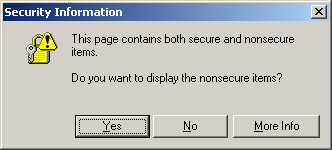
If the browser is viewing that current page in through HTTPS, then it'll request that asset with the HTTPS protocol, otherwise it'll typically* request it with HTTP. This prevents that awful "This Page Contains Both Secure and Non-Secure Items" error message in IE, keeping all your asset requests within the same protocol.

*Of course, if you're viewing the file locally, it'll try to request the file with the file:// protocol.

We use this trick in the HTML5 Boilerplate for a clever request of jQuery off the Google CDN:

  <script src="//ajax.googleapis.com/ajax/libs/jquery/1.4.2/jquery.js"></script>
  <script>!window.jQuery && document.write(unescape('%3Cscript src="js/libs/jquery-1.4.2.js"%3E%3C/script%3E'))</script>

Technically, this is called a "network-path reference" according to RFC 3986. Oh and if you want to be truly correct, you'll use the term "scheme" instead of "protocol" when talking about URLs.

This trick also works fine in CSS:

.omgomg { background: url(//websbestgifs.net/kittyonadolphin.gif); }

… assuming the site you're pointing to has this asset available on both HTTP and HTTPS.

Caveat: When used on a <link> or @import for a stylesheet, IE7 and IE8 download the file twice. All other uses, however, are just fine.

Thx to miketaylr, ralphholzmann, annevk for smarts on this, and ajaxian, where I think I learned it like 4 years ago? maybe?

2011.01.23: But.. what about using this on the google analytics snippet?

Yes of course, wouldn't that be nice.. So I worked with the Google Analytics javascript lead developer (God, I love working at google) to see if we could do this.. turns out we can't. There is an edgecase bug in IE6 that causes a dialog to blow up… under some security settings (unsure if they are default) when requesting form the non-'ssl' subdomain. screenshot here. So feel free to take 40 bytes off your GA snippet if you don't care about IE6.. otherwise you're gonna need that ternary operator. :)

2011.12.24. Eric Law (from the IE team) chimes on why IE6 doesnt play well GA…

The reason this doesn't work in IE6 is that the server is using SNI to deduce what certificate to return. XP (and thus IE6) doesn't support SNI in the HTTPS stack. See for details.

front-end development

  1. October 27th, 2010 at 11:28 #1

    Was just thinking.. I wonder if the SPDY protocol will throw everyone for a loop if they're using this technique. Hmm!

  2. October 27th, 2010 at 11:35 #2

    I wasn't able to find anything regarding the scheme to be used by SPDY in the Draft ( http://sites.google.com/a/chromium.org/dev/spdy/spdy-protocol/spdy-protocol-draft1 ), but it is noted that SPDY is meant as a replacement for HTTP.

    So in theory, it'll remain HTTP and HTTPS and not be SPDY://?

  3. October 27th, 2010 at 11:36 #3

    I just asked Mike Belshe, the lead engineer on SPDY and he said:

    That will work just fine.

    Boom.

  4. October 27th, 2010 at 11:37 #4

    Shouldn't you use

    document.write(unescape('%3Cscript src="js/libs/jquery-1.4.2.js"%3E%3C/script%3E'))

    because the contents of a script that with a src attribute are (at least to my knowledge) interpreted if the script fails to load.

  5. October 27th, 2010 at 11:38 #5

    This is an awesome technique to put in use for ecommerce sites that have a "checkout" flow where you start non-secure, switch to secure for payment, and back to non-secure for completion/receipt. Great stuff!

  6. October 27th, 2010 at 11:43 #6

    This is so much better than the Google Analytics way:

    var gaJsHost = (("https:" == document.location.protocol) ? "https://." : "http://.");
    document.write(unescape("%3Cscript src='" + gaJsHost + "google-analytics.com/ga.js' type='text/javascript'%3E%3C/script%3E"));
  7. October 27th, 2010 at 11:47 #7

    @Shi Chuan
    Indeed it is. Sadly, however, They do use a different subdomain for the SSL requests and you can cause an error dialog in IE6 if you use the protocol-relative URL for google analytics.
    I worked for a few hours with an Analytics engineer and Mathias Bynens trying to make that work. Sadly it couldn't.

  8. October 27th, 2010 at 12:08 #8

    This is a valuable best practice. The warning about stylesheet double downloads is important, esp. since stylesheets block rendering in many browsers – you don't want that blocking behavior to last any longer than necessary. So use this for everything except stylesheets.

  9. Jason
    October 27th, 2010 at 12:18 #9

    @Steve Souders
    IF you're worried about IE. Generally, I optimize maintainability over performance when possible, which in this case would ignore the performance hit for IE. Which is fine with me. Users of sub-par browsers shouldn't expect an optimal experience. Especially with the (anecdotal) observation that IE users tend to be corporate users who have high-speed networks anyway. This is, of course, just a personal preference. Generally I defer any performance related topics to your (Souders) expertise.

  10. October 27th, 2010 at 12:57 #10

    Ugh, I wish I had known this previously. Thanks Paul, this is very helpful.

  11. October 27th, 2010 at 13:01 #11

    I tried this, but found it a bit annoying since I often work with files locally.

    That said, for an http/https switching situation it is an elegant solution to the "this page contains insecure items" malarkey.

  12. October 27th, 2010 at 13:11 #12

    We use this all over my current project… did you tell me about it?

  13. Ryan
    October 27th, 2010 at 13:35 #13

    How could you not be worried about IE? That means you're not worried about a *HUGE* number of users

  14. October 27th, 2010 at 14:28 #14

    @Jason
    Um yeah.. whatchu talking about? This is all peachy everywhere with the exception of referencing stylesheets.
    So don't use it for that.

  15. Jeff Avallone
    October 27th, 2010 at 14:29 #15

    Wow, I actually used this technique at work just this morning to clean up some 3rd party code. I learned it years ago, but forgot about it until recently.

  16. Shelley
    October 27th, 2010 at 14:41 #16

    This is a great trick, wondering if it could extend to another issue we are having with Google Analytics dropping data. Apparently, if someone sends a link to us such as http://domain.com and as someone browses our site, they click on http://www.domain.com – GA drops referral data. I would think that using relative paths is the answer but we still experience dropped data. I wonder if this could work to help keep referral data from being dropped?

  17. A.C.
    October 27th, 2010 at 22:48 #17

    I ran into this exact problem the other day where we have a bunch of things using src=http:// but then we have a login and registration form that are on https and IE was throwing it's stupid warnings. The funny thing is that I've seen this in other people's code from time to time and I've always changed it thinking it was a typo! Thanks for enlightening me!

  18. Jean-Philippe
    October 29th, 2010 at 15:34 #18

    I use the technique a lot but with only one slash. Is it an error ?

  19. November 2nd, 2010 at 04:58 #19

    @Jean-Philippe: That’s just a root-relative URL then.

  20. November 2nd, 2010 at 18:35 #20

    Hi all,

    This is a neat trick I just learned about via Paul's Boilerplate. There is one caveat I ran into, however, which is that If I you are using (for example) IE6 in a VM accessing a network share the url will not be resolved. Addresses in this instance are like: "\\tsclient\Y\Documents\Account Services\CLIENTs\etc\etc\something.html".

    Not only that but IE6 will hang while trying to resolve until it gives up. I have not tried this with other browsers, as I just use that VM to keep a "real" version of IE6 around for testing. Multiple IE and IETester are nice, but I've been bitten a few times by them.

    Not a big deal, but did have me scratching my head wondering what was happening for a while.

  21. November 3rd, 2010 at 15:19 #21

    Paul, thanks for writing this up. It's a trick I've used for years and I spread it around at each dev shop I work in. Even good developers stare at me in disbelief when I tell them this is possible. I've been meaning to write a blog entry, but…

    @Pete B, @Andre Hayter: During development, I add a BASE tag to my pages to give the relative protocol something to hang onto. That way, if you're local and use file://, the base tag's http:// will allow protocol-relative paths to resolve correctly.

  22. November 4th, 2010 at 10:29 #22

    Hey Paul,
    Can you elaborate on why this doesn't work with Google Analytics? I don't see how it's any different than the CDN.

    Thanks,
    Nathan
    @Paul Irish

  23. November 4th, 2010 at 10:38 #23

    @Nathan
    Because if you notice in the analytics code, it swaps in a new subdomain if it's in SSL. The regular host doesn't have a legit SSL cert. This doesn't cause a problem for anyone but IE6, who throws up a dialog about insecure assets whatever when you try and do it. Here's a screenshot of that error: http://paulirish.com/i/1d90.png

  24. Alex
    November 10th, 2010 at 10:48 #24

    So this will automatically insert either https or http into the file name. Do I ever have to change it again or worry about it? For instance, if I put //mydomain.com/images/here.jpg it will convert to either https://mydomain.com/images/here.jpg or http://mydomain.com/images/here.jpg every time?

    Thanks for posting this by the way

  25. November 11th, 2010 at 19:02 #25

    was really hoping websbestgifs.net/kittyonadolphin.gif existed.

  26. kl
    December 13th, 2010 at 06:04 #26
    document.write("…&lt;\/script&gt;")

    unescape() is a lame hack.

  27. kl
    December 13th, 2010 at 06:05 #27

    Eh, those entities weren't supposed to be there.

  28. December 13th, 2010 at 12:26 #28

    Thank you. This is very helpful!

  29. Snow
    December 13th, 2010 at 15:29 #29

    Why do you have snowflake animations that take up 70% of my CPU ? While reading this page my computer actually gets hot !

  30. Flake
    December 14th, 2010 at 03:55 #30

    @Snow
    Right. Great post, but what on earth makes Paul think that this is a good idea? It was idiotic when it was called a blink tag; it's idiotic now. I can't read the content because of this absurd background.

  31. December 14th, 2010 at 15:02 #31

    This is really great. Thanks for the tip!

    Sadly, when using CDNs for HTTP and HTTPS delivery, you are almost always forced to use different domain names. E.g. Akamai (to my knowledge) charges the same rate regardless of protocol for accessing their SSL servers. So serving CDN content over http://cdn.domain.com and https://cdn.domain.com costs the same amount because it uses the CDN's SSL infrastructure. This really stinks when your SSL traffic is only 10% of your total traffic. If you pay 3x for SSL-CDN traffic, combining the domains would cost 270% of keeping them separate.

  32. January 16th, 2011 at 02:19 #32

    Cute & pretty trick.

  33. Greg Reimer
    January 27th, 2011 at 13:21 #33

    @Paul Irish

    Probably displaying my ignorance here but why doesn't GA simply use a single subdomain that supports both protocols and thus avoid the issue? Or maybe I'm not clear on the exact causes of the IE6 error.

  34. February 5th, 2011 at 12:29 #34

    I had a problem using this locally with IE7. See Local protocol-relative URL on oldIEs.

  35. February 16th, 2011 at 13:15 #35

    Just found out that this protocol relative URL causes Microsoft Outlook to hang because it tries to find your external resources on the local network. Check out: http://blog.feedblitz.com/2009/06/outlook-hangs-opening-emails-solved.html

    I just experienced the same issue, so HTML email and // are NOT sitting in a tree…

  36. February 18th, 2011 at 14:31 #36

    @Paul Irish
    no-http.org doesn't seem to work. It seems that "parked domain girl" is holding it hostage.

  37. Martin
    March 14th, 2011 at 04:24 #37

    @Curtis So was I!

  38. Torsten Baldes
    September 1st, 2011 at 12:27 #38

    is it possible to use this trick with scriptloaders like yepnope?

  39. September 19th, 2011 at 06:47 #39

    Looks like protocol-relative URL simply doesn't works with Firefox 6.0 (every OS) in
    @font-face {src:url()}

  40. September 19th, 2011 at 07:33 #40

    ok, sorry my fault.
    The bug was using @font-face in @media and this point was differing between my two test cases leading to bad conclusion. protocol-relative URL definitely works in FF6.

  41. September 19th, 2011 at 07:38 #41

    ok sorry, my fault. I was using @font-face in @media on one of my 2 tests cases and this leads me to a bad conclusion. protocol-relative URL definitly works in FF6.

  42. September 19th, 2011 at 07:59 #42

    ok sorry, my fault.
    I was using @font-face in @media on one of my 2 tests cases and this leads me to a bad conclusion. protocol-relative URL definitly works in FF6.

  43. October 12th, 2011 at 11:47 #43

    @Curtis

    Still laughing.

  44. November 27th, 2011 at 10:12 #44

    Dang baby, I love this!!

    Thanks again, Paul. I owe you at least a night of drinks for all the major tweaks and saves you share with the interwebs. Thanks !!!

  45. EricLaw [MSFT]
    December 24th, 2011 at 09:25 #45

    The reason this doesn't work in IE6 is that the server is using SNI to deduce what certificate to return. XP (and thus IE6) doesn't support SNI in the HTTPS stack.

    See http://blogs.msdn.com/b/ieinternals/archive/2009/12/07/certificate-name-mismatch-warnings-and-server-name-indication.aspx for details.

  46. January 11th, 2012 at 01:25 #46

    Thanks for the information!
    (I don't care about IE6, that's no problem.)

  47. Tom
    February 26th, 2012 at 02:28 #47

    What is the path to the local file ?
    I am asking about the following comment: Quote:
    "Of course, if you're viewing the file locally, it'll try to request the file with the file:// protocol".

    So, if the specified path is "//ajax.googleapis.com/ajax/libs/jquery/1.4.2/jquery.js" then what will be the requested local path ?
    For example, if I am looking at a file "C:\mydirectory\index.html" then the file need to exist at "C:\mydirectory\ajax\libs\jquery\1.4.2\jquery.js" or what ?

Comments are closed. Sorry dude.