Home > front-end development > Introducing… CSS3Please.com

Introducing… CSS3Please.com

March 9th, 2010

Man, whenever I'm writing some css3, I get so tired of writing all the vendor-specific prefixes (like -moz-border-radius). Combo that with remembering who supports what and I wantedneeded a shortcut.

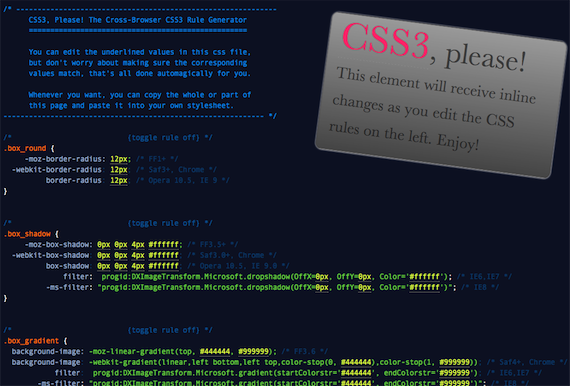
Today, I'm happy to release v1.0 of css3please.com: a cross-browser css3 rule generator, produced by Jonathan Neal and myself. In addition to syncing and normalizing changes across the necessary properties, it also sneaks in IE support for a few features via IE filters. Right now it helps you write the rules for: border-radius, box-shadow, linear-gradients, rotation and @font-face. A few more transforms like skew and scale are on their way, stay tuned.

Shouts to all the good people doing research and making tools in the css3 arena: John Allsopp, Chris Coyier, Stoyan Stefanov, Damian Galarza, Ryan Seddon, border-radius.com.

Please leave comments and feedback below.

2010.04.06 – Today I pushed a big update. Mousewheel support is much better and the clipboard interaction sucks a lot less. We now have 360° IE rotation support thanks to Zoltan as well as css transitions support. I also fixed a number of small bugs that were reported.

Based on the popularity of this tool, I'll definitely keep working on it; making it better for ya'll. If you would like to contribute, please contact me.

Chytac pa-belarusku (belorussian translation)

front-end development

  1. Fredrik Carlbom
    March 9th, 2010 at 11:03 #1

    Great site but it makes my IE6 crash :(

  2. March 9th, 2010 at 11:08 #2

    @Fredrik Carlbom
    Yeah the tool itself doesn't work so hot in IE6 and IE7 at the moment (tho the CSS it makes is peachy); it works a bit smoother in IE8 but not flawless yet.

  3. March 9th, 2010 at 11:13 #3

    Yay!
    That's cool. Now use jQuery from Google's CDN, merge all plugins into one file, minify it and put all the script tags on the bottom of body tag ;)

  4. March 9th, 2010 at 11:14 #4

    Rock on, Paul. That's some extra-spicy hotness you've got there! Beautiful job. Will make my super-fancy styling much faster now.

  5. Torsten
    March 9th, 2010 at 11:17 #5

    Great work!

    but where’s the theme-song? ;-)

  6. March 9th, 2010 at 11:23 #6

    @MyFreeWeb
    Thanks. I just put in the concat and minfication and cdn.. they're gonna stay in the head only because the js syntax highlights the page and I want to minimize FOUC. <3

    @Torsten
    Good call!

  7. March 9th, 2010 at 11:25 #7

    This is CSS heaven sent! As long as it stays up to date, this is really going to make life easier. Also, love the (shift) up/down arrow keyboard shortcuts. One criticism would be the color choice; being able to have a white background would be great. :)

  8. March 9th, 2010 at 11:28 #8

    Awesome! Of course, I went ahead and tried to break it:

    – Any support for ellipitcal border radius? Webkit Mozilla syntax differ.
    – Howz about inset box-shadows? Mozilla & Opera both support these.

  9. Greta
    March 9th, 2010 at 11:45 #9

    How about support for tabbing to the next property? Other than that I like it so far.

  10. March 9th, 2010 at 11:49 #10

    @David DeSandro
    I think i'll let border-radius.com take the elliptical border radius market for now, but who knows.
    good call on inset box shadow.

    @Greta
    definitely. i'll do that. :)

  11. March 9th, 2010 at 12:04 #11

    I wonted to build something similar with pure CSS, something like CSS3 framework. But I realized that make no sense building CSS framework for CSS3 effects because is not dynamic. But with little javascript(jQuery) you resolved this issue :). Great work!

  12. March 9th, 2010 at 12:37 #12

    wow, this is really gread – and inspiring!

    One thing you could add is rgba background color. IE can fake it with the gradient filter.

    Good job!

  13. March 9th, 2010 at 12:39 #13

    Cool! So would this become like CSS zen garden and you can customize a whole page? Or just the box?

  14. March 9th, 2010 at 12:46 #14

    Externally useful for cross-browser rapid css dev

  15. March 9th, 2010 at 12:58 #15

    That is really cool, but I agree about the colors. I can't read some of the blue text on the dark background at all, though I think part of that is the absolutely horrendous rendering of the font.

  16. March 9th, 2010 at 12:58 #16

    Nicely done! It's missing border-image though ;-) …
    http://www.w3.org/TR/css3-background/#border-images

  17. March 9th, 2010 at 13:26 #17

    Awesome! Great concept and implementation! The design rocks too. I'll spread the word.

  18. March 9th, 2010 at 13:58 #18

    My god. This is awesome.

  19. March 9th, 2010 at 15:47 #19

    It doesn't work if you use RGBA for the colors. :-)

  20. March 9th, 2010 at 15:56 #20

    @Dominik H.
    Thx for the heads up. We got a new engine brewing in the background that should address that.

  21. March 9th, 2010 at 16:05 #21

    Fantastic job guys. Especially impressed when, out of habit, I used the arrow keys to change the value… nice. Would like the option of a white background tho :-) Thanks again!

  22. March 9th, 2010 at 16:14 #22

    It would be great if you got a preview of the css like this site does for rounded corners: http://border-radius.com/

  23. March 9th, 2010 at 16:15 #23

    @Bobby Nevermind, I'm really dumb… It updates the logo, didn't notice that…

  24. Marcy
    March 9th, 2010 at 16:53 #24

    Will you be including any -khtml- rules?

  25. March 9th, 2010 at 16:56 #25

    Damn brilliant! It's like a million random CSS3 blog posts jammed into a single kick-arse tool – I can feel the CSS3 start flowing through my veins! I better see a doctor about that.

  26. March 9th, 2010 at 17:09 #26

    @Marcy
    It's unlikely that I'll add in support for -khtml.. I can't find a compelling reason to do so.

    @Mr Speaker
    Thx mucho, mi amigo.

  27. Andy L
    March 9th, 2010 at 21:28 #27

    Great tool!

    But it would be great if it would have a white background instead — its much easier on the eyes!

    If you really don't want to do that, you could at least improve the comments contrast.

    But all in all: Excellent work! Thank you!

  28. March 10th, 2010 at 02:06 #28

    Great idea, it would be great if it support rgba in instead of only hex (i know their is the rgba rule as well, but for things like boxshadow I use rgba.

    Thanks

  29. webetcaetera
    March 10th, 2010 at 02:25 #29

    Great !! and we don't matter IE6, he's dead :)
    Thanks very funny and interisting!

  30. arun
    March 10th, 2010 at 05:23 #30

    great.. thanks very interesting :)

  31. March 10th, 2010 at 06:06 #31

    That is one very excellent tool. I agree with an earlier comment about the comment colour making them difficult to read, but otherwise it's very very cool!

  32. Andy
    March 10th, 2010 at 07:15 #32

    Amazing. Thanks so much for the interesting article. I've been intimidated by CSS3 for a while now and now I think I love it.

  33. March 10th, 2010 at 08:15 #33

    great tool!
    thanks

  34. March 10th, 2010 at 09:19 #34

    I started working on something similar to this last weekend…

    http://css3generator.com

    Just didn't quite have time to finish everything I wanted. Hoping to add live preview, tips and example code soon.

    I love your version tho. Great job!

  35. March 10th, 2010 at 10:21 #35

    Real nice !

    Two suggestions:

    1. Ability to save and send url with specific settings to someone
    2. Ability to use several shadows, I'm not sure it's working, for ex.: -moz-box-shadow:0 15px #FFFFFF, 1px 5px 10px #777799;

    Keep up the good work !

  36. March 10th, 2010 at 11:54 #36

    @Randy Jensen
    Ah very nice. I think yours handles some cases where css3please will never succeed well. Happy to see it move forward. :)

    @Warpdesign
    Very nice. Good feature requests. I'll probably prioritize working with rgba as an arbitrary color everywhere, but I like these ideas a lot.

  37. Mateus
    March 10th, 2010 at 12:52 #37

    man, thats awesome!
    thank you, and everybody involved in this project, very much, just what i needed.

  38. patrick
    March 10th, 2010 at 13:21 #38

    great work guys!!!

  39. Irae
    March 10th, 2010 at 16:26 #39

    This is indeed useful!

    I miss IE6+ working version. Even if only toggling on/off would be great. I don't really care for the editing part to work there.

    It is a tedious task to copy the styles and test by hand. But it's nice to have this as a reference! =)

  40. RobW
    March 10th, 2010 at 17:13 #40

    When entering a shorthand hex value, such as #000 for black, it replaces it with #0000 causing NaNs in rgba()

    Just a heads up!

  41. March 11th, 2010 at 00:04 #41

    Nice work! Looking forward to the updates :-)

  42. bunty
    March 11th, 2010 at 01:17 #42

    Simply Superb! I m loving it!

  43. March 11th, 2010 at 02:19 #43

    Love this page. Doesn't fill stuff in like I imagined from the teaser text at top. But I've used this a bunch of times since Friday. Thanks!

  44. March 11th, 2010 at 07:17 #44

    great interface

  45. xochi
    March 11th, 2010 at 09:16 #45

    In Firefox and Webkit, the RGB value in box_rgba is always applied and the RGBA value isn't, so no transparency is visible. (It works in Opera) There's also an error in the formula that converts between them (comment #40).

    Rotating the box makes it lose position:fixed in Webkit, is that a Webkit bug?

  46. March 11th, 2010 at 11:18 #46

    This is excellent, although where were you a week ago Mr Irish!?! I'll use this in my next project instead :)

  47. March 11th, 2010 at 11:19 #47

    I don't see all property in IE8
    gradient and rgba are OK
    .box_shadow just make a text-shadow effect
    .box_rotate just make the text look better (antialiasing)
    and offcourse there is no rounded corners

    Did i need something more than the browser itself ?
    For information my version of IE8 : 8.0.6001.18702

  48. Mark
    March 11th, 2010 at 12:37 #48

    Awesome work! Thanks for making it publicly available!
    Gradient doesn't seem to work in FF 3.5.2. :(

  49. JD Gomez
    March 11th, 2010 at 14:22 #49

    Great tool Paul, keep it growing.

    Maybe the

    text-shadow

    could be implemented there also?

  50. March 11th, 2010 at 16:11 #50

    @Rico
    IE8 isnt supported all the time, but rotation should be okay. I'll see if i can replicate.

    @Mark
    FF3.5 doesnt have gradient support. only 3.6 does.

    @JD Gomez
    text-shadow aint bad at all. I already have the syntax for it. it'll go in. thx. :)

  51. March 11th, 2010 at 16:14 #51

    Wonderful, useful resource for me! Thank you!!!

  52. March 11th, 2010 at 16:39 #52

    That's a really great resource. Four things, though:

    (1) You've listed box-shadow as a supported property in IE9. Is this accurate? I haven't seen this confirmed anywhere.
    (2) IE has supported @font-face with EOT since IE4+, not IE6+.
    (3) How about a really simple section for the opacity property?
    (4) Shouldn't you specify trutype fonts as working in FF3.5+?

  53. March 11th, 2010 at 18:57 #53

    Loving it, nice way to display it.

    keep up the good work.

  54. March 11th, 2010 at 22:25 #54

    Thanks for the shout out Paul.

    Nice work and love the little things you've done, mouse scroll to increase/decrease the values is a nice touch.

  55. March 12th, 2010 at 05:45 #55

    Fantastic idea, love it…
    The displayed block on the right doesn't seem to work all that well in IE8, but the rules are all correct and that's what matters.
    I'm sure I'll be using this on my next project. Thanks!

  56. March 12th, 2010 at 11:45 #56

    A tweak to .box_shadow (based on your default values), as I think Microsoft's Shadow filter is the one you want (since Dropshadow results in a solid block of color). Try:

        filter: progid:DXImageTransform.Microsoft.shadow(Color='#ffffff', Direction=180, Strength=4);
        -ms-filter: "progid:DXImageTransform.Microsoft.shadow(Color='#ffffff', Direction=180, Strength=4)";

    These also function as a rough equivalent to text-shadow for all child elements if the filtered element has no defined (solid) background-color.

  57. March 12th, 2010 at 12:21 #57

    @Erik Vorhes
    Thanks Eric. Dropshadow snuck in there even though I've been using Shadow as well.. I'll definitely change that up, as the current DropShadow is crap. :)
    Thx

  58. midu
    March 12th, 2010 at 14:38 #58

    Excellent

  59. March 12th, 2010 at 16:03 #59

    The firefox gradient values are backwards. The gradients run the opposite direction from shown on Firefox.

  60. mpmchugh
    March 12th, 2010 at 23:27 #60

    Was just about to write that the firefox gradient values are reversed, which Ted also wrote, but you can also just switch the "top" direction to "bottom".

    -mpm

  61. March 13th, 2010 at 13:37 #61

    Fantastic tool! Any plans to add text-shadow as an example?

    -dti

  62. March 13th, 2010 at 13:48 #62

    @Jason Chandler
    Yes! soon.

  63. Brian Zerangue
    March 14th, 2010 at 00:49 #63

    Awesome! Thanks for posting this!

  64. March 14th, 2010 at 14:10 #64

    This a fun and an intuitive way of learning CSS 3.0. I thank you for doing such a wonderful work.

  65. March 16th, 2010 at 16:09 #65

    Don't work on Opera 10.10

  66. March 17th, 2010 at 11:49 #66

    Fantastic tool.

    Though the rgba control needs looking at in Chrome.
    It applies NAN values too easily.
    It may be better to use 00 when NAN would be the result.

    Also IE drop-shadow filter usually looks rubbish, but a better effect can be obtained using the glow filter instead.

    Useful piece guys.

  67. March 17th, 2010 at 11:52 #67

    @mike foskett
    Thanks Mike. We'll be landing a bunch of improvements soon that should tackle those issues.

  68. Mike
    March 18th, 2010 at 10:10 #68

    OMGWTF I love you.

    please tell me you aren't already a father cause I would like to bear your children.

    Thank you.

  69. Luka Stolyarov
    March 18th, 2010 at 18:34 #69

    I was having issues with the transparency solution you had for IE8. For some reason it would always come up as a solid color, even though it'd be transparent in ie7.

    This is what I ended up using to get it to work in ie8:

    -ms-filter:"progid:DXImageTransform.Microsoft.Alpha(Opacity=60)";
  70. stuart lamour
    March 19th, 2010 at 12:15 #70

    this actually rules – thanks guys!

  71. Grady
    March 19th, 2010 at 16:35 #71

    The solution you've shown for rotation in IE leaves much to be desired.

    1) BasicImage can only rotate in 90deg increments. So you're provided example of 7.5deg doesn't do anything at all in IE.
    2) The Matrix filter offers a much more robust rotation framework.
    2a) The calculations from degrees to a matrix are ugly.
    2b) The transform-origin in IE is defaulted at something other than 50% 50% like moz and webkit.
    2c) IE lets you set the transform-origin (Dx and Dy) but that means it won't properly re-size the bounding box. It's either/or.
    2d) IE transforms without including padding and border which further confuses the transform-origin.

    It's not exactly possible to do a direct cross-browser rotation. Here's a complicated article that someone should re-write into English.

    http://someguynameddylan.com/lab/transform-origin-in-internet-explorer.php

  72. March 19th, 2010 at 16:44 #72

    @Grady
    Thx very much for the comment. My buddy Zoltan did some kickass work with rotation that I hope to integrate into this soonly:
    http://www.useragentman.com/blog/2010/03/09/cross-browser-css-transforms-even-in-ie/

    Thx for dropping the knowledge and for the link. We'll upgrade this badboy.

  73. March 23rd, 2010 at 18:47 #73

    Great job on this tool, Paul. What kind of traffic have you been getting on that page? I imagine quite a bit, as it's been tweeted and shared quite a bit in the community.

    FYI – About a month before you released your tool I had put up a CSS3 "click chart":

    http://www.impressivewebs.com/css3-click-chart/

    But yours is so much more useful! Thanks again.

  74. March 26th, 2010 at 00:45 #74

    The problem with the box-shadow equivalent in IE using their own proprietary filter is that the shadow itself is counted to the total width of the element. So if you have a 'strength=7' value on all sides of the box it will consume 14px vertically and horizontally.

    Anyone who managed to solve this? I think it can be done using positioning but I doubt it's practical.

  75. allen joslin
    March 26th, 2010 at 06:21 #75

    can this be used to create pure css-tabs ? (without worrying about flaring out the bottoms of the tabs, which would be even cooler) I could use color & font changes to handle the current tab.

  76. March 27th, 2010 at 04:17 #76

    Nice. Good work! Does it mean the end of photoshop? ;)

  77. March 28th, 2010 at 13:12 #77

    Yay! Wicked!

  78. March 28th, 2010 at 22:04 #78

    Brilliant. Huge thanks for writing this and making it available.

  79. March 30th, 2010 at 11:17 #79

    Cool. It'll help a lot to get to grips with the new stuff in CSS3.
    Congratulations.

  80. March 30th, 2010 at 11:36 #80

    Hi Paul, really great and clean solution! And thank you for playing area at the bottom of this page! ;-) Relaxing!

  81. March 30th, 2010 at 13:40 #81

    Nice work. It's nice to find people like you on the net. Thanks, keep up the great work.

  82. Nathan
    March 31st, 2010 at 10:37 #82

    Hi Guys, I'm excited about the possibility but I'm looking at http://css3please.com/ in IE6-8 and don't see the shadow working. The gradient will work if I toggle the shadow style. I couldn't get rotate to work. Am I missing something? Nice work so far.

  83. April 2nd, 2010 at 18:03 #83

    FYI, The gradient rules for IE don't work. They use

    startColorstr

    and

    endColorstr

    . These should actually be

    startColorStr

    and

    endColorStr

    (CamelCase). See MSDN documentation.

    Thanks for all the work. It's a mighty handy tool!

  84. deren
    April 6th, 2010 at 05:05 #84

    Great site.
    Why hasn't microsoft introduced this CSS3 feature yet?

  85. Jesse
    April 6th, 2010 at 07:01 #85

    Gradient for WebKit seems to be reverse of other gradients (i.e. bottom to top instead of top to bottom)

  86. April 6th, 2010 at 10:00 #86

    Hi there,
    Nothing about column-count, column-gap and that kind of stuff?
    We miss them!
    =)

  87. April 6th, 2010 at 10:25 #87

    I just pushed a big update.
    Mousewheel support is much better and the clipboard interaction sucks a lot less.
    We now have 360° IE rotation support thanks to Zoltan and css transitions. (Along with a buncha small fixes like the gradient thing)

    @STPo I'm personally not crazy about columns so you'll have to hit up http://www.css3generator.com for that.

    @Gordon Brander Fixed!

    @allen joslin Nah this isn't gonna help with pure css tabs.

    @Grady You should dig the brand new rotation logic.

    Thanks all for your comments and feedback.

  88. Tyler
    April 7th, 2010 at 14:31 #88

    I would love to see the ability to switch between top-to-bottom and left-to-right gradients. IE can do this according to http://www.scriptfx.com/transitions/gradient/gradient_filter.htm

  89. April 8th, 2010 at 09:28 #89

    thanks for sharing !!!

  90. April 11th, 2010 at 13:14 #90

    Thanks for sharing ! Great ressource I always keep around when I'm coding…

    I was just wondering how can you calculate the degrees for the ie box rotation ?

  91. Randy
    April 12th, 2010 at 15:26 #91

    Very cool! It would be nice to get rounded corner settings for each individual corner for when authoring tabs (i.e. only 2 corners rounded) since these settings are also not consistent across browsers.

  92. April 13th, 2010 at 12:47 #92

    @STPo
    Anothe good explanation of why multicolumn css layout is troublesome..

    @Jµ
    We're using math that's described in this post:
    http://www.useragentman.com/blog/2010/03/09/cross-browser-css-transforms-even-in-ie/

    @Randy
    Definitely. We'll add the ability to switch from basic mode into TRBL mode. :)

  93. April 13th, 2010 at 12:49 #93

    Also btw.
    I maintain a beta version of this at css3plz.com if anyone wants to spy on upcoming features.

  94. April 18th, 2010 at 12:51 #94

    Box gradient wasn't supporting rgba values. Any idea why?

  95. April 19th, 2010 at 10:35 #95

    Hey Paul, great tool, thanks.

    Can I suggest a tiny little fix? The rotate filter breaks subsequent css for IE6, but it seems to work if you reorder the matrix array, putting sizingMethod at the end of the M values, rather than before.

    Thanks!

  96. April 20th, 2010 at 07:53 #96

    Brilliant work.

    Thanks a lot for this useful tool.

  97. April 20th, 2010 at 14:51 #97

    Hi, the CSS3Please is great and useful, but as I use TextMate, i thought it would be even better if I could generate the snippets right in the editor (even loosing the ability to preview it). So I've packed the snippets into a simple bundle and here it is:
    http://github.com/filipepina/CSS3-Please-TextMate-Bundle

    I've made it two weeks ago and i think you have changed a few things regarding IE, I'll change that later!

  98. Tnobs
    April 21st, 2010 at 04:19 #98

    Sorry, didn't check for all comments and feedback, just a quick feedback. If I use the filters for IE7 (corrected to be single line), the whole css get's fucked up.

    Beside this… really handy site, I use it quite often, thanks..

  99. Wayne
    April 24th, 2010 at 19:04 #99

    For the missing CSS3 for IE like dropshadow, textshadow and border radius simply implement this .htc file in your CSS.

    http://fetchak.com/ie-css3/

  100. April 27th, 2010 at 01:52 #100

    Your site is damn nice — many thanks!

    It shows very clearly how CSS3 will make _my_ life easier.

  101. April 27th, 2010 at 04:48 #101

    In order to make the MS transparency filter work for IE8, you will have to set background:transparant before declaring. Remove the background-color declaration.

  102. Elliott Saille
    May 3rd, 2010 at 12:15 #102

    Great tool i love it thanks for the hard work

  103. May 4th, 2010 at 10:05 #103

    awsome! thans for your hard work.

  104. Snooper
    May 11th, 2010 at 16:12 #104

    Thanks!

  105. Ivo Trompert
    May 12th, 2010 at 15:29 #105

    Is it possible to add more color stops?

  106. Grady
    May 18th, 2010 at 12:29 #106

    @Paul Irish
    http://wiki.github.com/heygrady/transform/correcting-transform-origin-and-translate-in-ie

    I've started on a jQuery plug-in that does the transformations cross-browser. I've managed to approximate support for transform-origin in IE using the sylvester.js library. It work's perfectly in my testing down to IE6. I've posted an article about how to make IE behave and have a standard transform-origin.

  107. May 22nd, 2010 at 11:13 #107

    WOW! Great tool!
    I like your tool and came here to say grats…but, wow! what an amazing effect on your background!!!
    I simply gave up! Keep up the good Job!

    -Shahab

  108. Ceane
    May 22nd, 2010 at 19:19 #108

    How do you get box shadow not to stretch your page out? I have a div that stretches 100% of the page's width and when I add box shadow it stretches it the length of the shadow. Please Please help, I really do apprecieate it. And I LOVE your site, it's amazing.

  109. May 28th, 2010 at 15:42 #109

    Thanks for the great site! I would appreciate support for gradients with multiple stops.

  110. Luc
    May 28th, 2010 at 19:43 #110

    Very nice job man! Keep going!

  111. Rachel
    June 2nd, 2010 at 15:29 #111

    I just loooooved this :)

    Just a heads up, at least on FF 3.6.3 when I set some values for the alpha channel in rgba() like 0.9 or 0.7, it returns NaN.

    Also, the hack for this to work in IE8 doesn't really work on mine (Win7). This is what I used instead:

    -ms-filter: "progid:DXImageTransform.Microsoft.Alpha(opacity=90)";

    Hope this helps :)

    Again, great work, man! Keep it up!

  112. June 5th, 2010 at 09:43 #112

    repeating the usual, awesome. Thank you very much.
    and nice work on this site too, the mouse moment swirls. cool !!

  113. infocyde
    June 11th, 2010 at 11:30 #113

    Thanks for posting, a nice all-in-one CSS 3 reference for common task.

  114. June 11th, 2010 at 21:36 #114

    Thia is AWESOME! I took a break from web work for just a bit and suddenly I found I need to learn CSS3 (& HTML5) and I was shaking in my boots. I was a Queen in the CSS2's & XHTML, but was lost with CSS3 and different browser requirements. I thought I would have to give up, but you've made it make sense to me when no one else could. I can't thank you enough. I'm back to learning, but now need to know just how I can make my site fit a hand held, a netbook, a 1600 by x, etc. Thanks again for getting me back on the road the learning again; I loved it before and then got lost. Now I'm found. YaY!

  115. Michael O'Neal
    June 17th, 2010 at 11:55 #115

    You've made the web a better place. I am writing much better code now and am going back over code I've written and easily update my incomplete CSS by dropping my settings into your code and retrieving the cross browser results.
    Will definitely subscribe to this page in my reader so I will be notified as soon as there are any updates. You have made me a better netizen.
    Aside: Would love to know how you make it so I can Doodle in the margins.

  116. Michael O'Neal
    June 17th, 2010 at 12:11 #116
  117. June 21st, 2010 at 05:37 #117

    I share Nancy´s opinion: Greatest Tool ever for intuitive code work! Thanks a lot, i adore it!

  118. June 21st, 2010 at 05:50 #118

    Interesting: I just tried to use the IE-Filters for a rotation-Property on my portfolio-Site alexweb.info. IE8 behaves like it should, but in IE7 all my other scripts (cufon an jquery) are destroyed, and the filters don´t work either. That´s not bad, for the effect must´t be seen in the IE´s – Progressive Enhancement. It´s just always testing on the web.

    Interesting No. 2: The Rotation by IE-Filters ist not quite the same like with just CSS3: The latter rotates the object (an img-Tag in my case) around its middle point, whereas the IE-Filter takes the upper right corner of the object as the fixed point for the rotation. Did you realise this difference?

  119. June 21st, 2010 at 10:39 #119

    @Alex
    1. very interesting. Yeah these IE filters implictly come with a YMMV tag on them. :)

    2. Yes indeed. There's nothing I can do in the UI to accomodate for this (unless i ask for the actual height/width dimensions of what you're rotating..) but this wil have all the answers you need: http://wiki.github.com/heygrady/transform/correcting-transform-origin-and-translate-in-ie

  120. June 22nd, 2010 at 07:23 #120

    All important CSS3 features on one page, thx for sharing that overview Paul!

  121. June 24th, 2010 at 21:19 #121

    Great site!

    I was wondering if there is an equivalent for CSS2?

  122. June 29th, 2010 at 21:13 #122

    I couldn't get RGBA working with your syntax, but I got it working in IE 6, 7, and 8 using the following syntax:

    .shadow {
    filter:progid:DXImageTransform.Microsoft.gradient(GradientType=1,startColorstr=#33000000,endColorstr=#33000000);
    background: rgba(0, 0, 0, 0.2);
    }
     
    <!--[if IE]>-->
     
     .shadow {
     background: transparent;
     zoom: 1;
     }

    And how about adding a text-shadow property for modern browsers and IE.

  123. Ge0rgy
    July 12th, 2010 at 09:51 #123

    Hi,
    i need to put some dropshadow to div- (and perhaps table-) elements.
    The Defiitions from your generator work quite fine in Firefox, but i cant geht the shadow to work in IE8, even with the .htc-file mentioned in the comments or the
    -ms-filter: "progid:DXImageTransform.Microsoft.Shadow(Strength=6, Direction=135, Color='#000000')"

    Definition. The shadow does never appear in IE.
    Is it necessary for the element which should get the shadow to have a fixend width ?
    I'm sorry that i could not provide smaple code but i have to use this to "modernize" some extranet-website which was developed 10 years ago in IE-Only-Fashin and now should get some new layout, and cross-browser-support (finally some doctype, yay!)
    As mentioned before the Filter does not show up and even this developer-Gadget in IE does not show it in the css-area.
    I'm using windows 7 as OS, in case this is important…
    any ideas?

    Thanks in advance,
    Ge0rgy

  124. July 18th, 2010 at 19:12 #124

    @Fredrik Carlbom

    unless i'm mistaken, the tool itself makes no claim to run in IE6, but rather to generate cross-browser css. best to run the tool itself in a modern browser like FF or chrome or ie8. am i correct about that?

    i DO hope the authors will sneak in more IE6 generated css!

  125. Jaycbrf4
    July 28th, 2010 at 08:07 #125

    There is no eot fonts on the @font face rule, So IE is ignoring it all!

    The goal of most web designers is to get their design to work in IE so if you could make your rules more cross browser compliant it would be better.

  126. July 28th, 2010 at 10:27 #126

    @Jaycbrf4
    I see the .eot in there… http://paulirish.com/i/f000.png

  127. August 4th, 2010 at 23:55 #127

    This has been very handy. Thanks!

    What is the support for alpha gradients? You could do some nice stuff with alpha gradients..

  128. Michael Thorne
    August 11th, 2010 at 12:18 #128

    This tool is awesome! You have really done your research on this. I know of no other tool that makes it so easy to create slick CSS3 snippets so easily. Can not wait to see what else you add to this tool.

  129. Michael Thorne
    August 12th, 2010 at 11:38 #129

    I was just experimenting with the background gradient feature. I wanted to create a gradient with a transparency, and it turns out that it is easy to do by using rgba colors instead of HEX colors. This is awesome! I tried putting rgba colors into css3please, but rgba colors do not get interpretted correctly. When I put in rgb colors it converts these to HEX just fine, but obviously rgba colors cannot be converted since there is no transparency version of HEX (I wish!).

    Anyway … would love to see support for rgba in a future version if it is not too much work.

  130. August 12th, 2010 at 12:00 #130

    @Michael Thorne
    Hey Michael. Good call and I appreciate the push.
    There are some javascript architectural reasons it's been hard to add rgba but I'm making it a priority.. Cuz I agree.. hex only goes so far.

    Cheers.

  131. vee
    August 22nd, 2010 at 04:36 #131

    Fantastic! Thank you or your great work!

    Is there any way you will also be covering the box-sizing values, like the CSS3Generator?

  132. August 25th, 2010 at 14:59 #132

    .box_rgba {}

    /* IE 8 comment isn't closed. Fix please!

    Also thanks for a great css cheat-page!

  133. August 26th, 2010 at 10:54 #133

    hey, nice work!
    but I've got a problem using gradient for the background of a page. I put the code from css3please.com and used it as background of the . this works fine as long as the viewport is bigger than the content, if i had to scroll the gradient is shown as patterns. only the beloved IE8 does it right.
    Ideas someone?

    Greetz

  134. August 29th, 2010 at 12:55 #134

    I love the css3please.com site and makes my life easier… just curious why you do not use the -o- extension for opera? Perhaps it should be added, or is it not necessary?

  135. August 31st, 2010 at 17:12 #135

    You are my new hero. CSS3please is… absurdly brilliant. And I thought rounded corners were the future.

  136. September 3rd, 2010 at 10:51 #136

    ok, solved my problem: if you want to use gradient for site background add it to the <html> and use a

    background-attachment:fixed;
  137. September 4th, 2010 at 09:09 #137

    Great Work and Great site.

  138. David Hucklesby
    September 5th, 2010 at 19:05 #138

    One caveat about using the IE gradient filter for rgba background color: the filter fails in IE7 when any degree of page zoom is applied (other than 100%). :(

    The .box_rotate calculations alone will save me lots of work. Thank you, thank you.

  139. Clemens
    September 9th, 2010 at 05:57 #139

    Hey,
    very nice site :)

    btw, Chrome 6 supports box-shadow without the vendor prefix. Should be added to the comments in the box-shadow section, as it's one step out of the vendor prefix mess ;-)

  140. September 10th, 2010 at 20:27 #140

    Great resource, I find myself coming back here very often to grab code snippets to 'enhance' sites to people with better browsers! Thank you for time spent, awesome execution!

  141. September 13th, 2010 at 17:22 #141

    Hey Paul, just thought I would mention this: When I copy and pasted the .box_rotate styles at the top of my CSS, none of the CSS would load in IE6 and 7. I just moved it to the bottom of the CSS and everything worked fine. Have you run into this or should I explore further? Not a huge deal, just curious.

    Thanks so much for your kick-ass hard work. Peace!

  142. September 14th, 2010 at 15:28 #142

    Hey Paul,
    here's what I discovered on the weird css rotation thing:

    IE6 and 7:
    You must declare at least height or width on the div that's going to be be rotated BEFORE your rotation filters appear in the CSS. Even if you do this, however, any styles applied to that div AFTER the rotation filters appear in the code will not be applied. The same seems to be true for any styles applied to that div's children as well. Weird.

    IE8:
    This seems to not be a problem. I successfully applied styles to the div (including declaring its height or width for the first time) after the rotation filters appear in the code.

    Obscure, sure, but it could definitely be a lot harder to hunt down in a huge stylesheet. Hope this helps!

    Thanks a ton!

  143. September 17th, 2010 at 13:21 #143

    The tools is just amazing! I don't understand how I lived all these years without it. Thank you very much for the excellent job!

    Peace!

  144. Ahmet Sali
    September 20th, 2010 at 18:46 #144

    This tool has been too useful for me! Thanks Paul :)

  145. rajani
    September 22nd, 2010 at 00:12 #145

    u indeed make www fun!! awesome :)keep it going!!

  146. Viktor
    September 29th, 2010 at 00:00 #146

    GREAAAAAAAAAAT TOOL! Keep it up! :)

  147. September 30th, 2010 at 00:04 #147

    Great tool!

    The rgba color's "a" isn't working. Anything but 0.5 doesn't work (returns NaN).

    Also, something I'd like to see is support for vertical and horizontal values for the border radius property (e.g. -webkit-border-bottom-left-radius: 5px 10px; )

  148. September 30th, 2010 at 14:16 #148

    Paul, more CSS rotation weirdness to report:

    In IE6 and 7, even if you follow the rules I posted a few comments back, you will still totally break your site if you use more than one rotation filter per external CSS file. You either have to have separate CSS files per rotation filter, or simply add each filter nested in its own unique style tags in the head of your html. Failure to do so will only display the first rotated object, but even this will be blurry and at the incorrect angle.

    Hilariously, removing the DOCTYPE causes all the rotation to render perfectly, so I'm assuming quirks mode knows how to handle multiple rotation filters? Also, with a larger, more complex stylesheet, there were even weirder side effects, but I couldn't pinpoint what was causing those. Anyways…

    Take home message:

    Use only 1 proprietary ms filter: (when used for rotation, at least) per external stylesheet.
    and..
    Each rotation filter in your html must be in its own set of style tags.

    Hope this helps! Thanks a million!

  149. verbatim
    October 8th, 2010 at 09:24 #149

    Thanks for excellent site, css3please.com. i recently discovered you forgot to mention vertical and horizontal gradients for ie:

    GradientType=0 : vertical gradient
    GradientType=1 : horizontal gradient

    filter: progid:DXImageTransform.Microsoft.gradient(startColorStr='#001d77', EndColorStr='#3db7e4', GradientType=1 ); /* IE6,IE7 */
    -ms-filter: "progid:DXImageTransform.Microsoft.gradient(startColorStr='#001d77', EndColorStr='#3db7e4', GradientType=1 )"; /* IE8 */

  150. October 13th, 2010 at 04:16 #150

    Would love to add multiple backgrounds as well, same as there:
    http://www.impressivewebs.com/css3-click-chart/

    Thanks for the great tool!

  151. October 16th, 2010 at 10:40 #151

    Hey!
    Nice site!

    Only issue I see right now is the ability to use RGBA inside of other elements like… box-shadow :-\ It's my only extra step I have to do after using it.

    Thanks for this!

  152. October 21st, 2010 at 09:09 #152

    hey

    thanks for this great site, anyway, there is a method to make opera read gradients:

    background: url(../images/bg/button-dark-gradient.svg) no-repeat scroll 0 0 #067abb;

    + the svg:

     
  153. Rebecca
    October 22nd, 2010 at 11:00 #153

    Thank you very much. Very cool tool. Nice work. :)

  154. Chris Burrell
    October 22nd, 2010 at 16:58 #154

    Transparency, Please! ;)

  155. October 26th, 2010 at 04:36 #155

    Thanks, I played with your page and found it very convenient, especially the IE specific parts!
    A few comments:
    - rotation didn't work for me in IE 7 (try -90 degrees)
    - will this be compatible with IE 9?
    - any way to have the URL reflect the choices? Once I have selected my settings in a browser, I'd like to quickly look at the result in other browsers.

    Thanks again!

  156. November 3rd, 2010 at 12:39 #156

    Would you be opposed to putting this up on github (or something similar) and allowing others to implement it on their own sites? That way people can implement things they want, like multi-columns or different styling (seems like a lot of people would prefer a different background).

  157. November 3rd, 2010 at 12:59 #157

    @curtis
    It's up on github! https://github.com/paulirish/css3please
    In fact in the issue tracker are all the bugs/features I'm currently tracking. I'd love help with those features.

  158. November 3rd, 2010 at 13:59 #158

    Ah. Awesome. I'll take a look, though I doubt I'd be much help; I'm a jQuery n00b.

  159. November 3rd, 2010 at 14:09 #159

    Awesome, should've thought to search.

    I'll take a look, but I'm a jQuery n00b, so I don't know how much help I'll be.

  160. Susan MacPhee
    November 8th, 2010 at 12:19 #160

    Thanks so much Paul. Finally a easy way to use CSS3. I was intimidated before. Also thanks to Boaz Sender for showing me the site at Design Camp Boston. http://blog.designcampboston.com/2010/css3

  161. November 8th, 2010 at 13:49 #161

    First site ever. Had to fight off the weirdness from AT&T on a Netopia (last course I toook was HTML1 !) and now, using Kompozer, and GIMP I'm trying to make a fluid site from scratch. Full on line store (what little I could afford from CoffeeCup) and found this site… FREAKIN AWESOME. Thank you so much.

  162. Kasia
    November 12th, 2010 at 16:45 #162

    Hey, thanks for this fantastic tool. It helped me a lot. Great job! :-)

  163. November 16th, 2010 at 02:46 #163

    Awesome tool, Easy to use CSS3, easy to edit too, thanks for sharing.

  164. November 16th, 2010 at 03:20 #164

    A note for me and the other css3please developers.. Curtis imported all the feedback from the comments into the github issue tracker up to this point.
    thx curtis!

  165. Chandni Sharma
    November 18th, 2010 at 06:42 #165

    Nicely done :)

  166. Ernie Ball
    November 25th, 2010 at 09:36 #166

    Excelent, good work !!! and thanks for sharing !!

  167. bartaz
    December 6th, 2010 at 13:52 #167

    Recently I've done some testing around cross-browser CSS3 and simulating it with IE filters.

    First of all I have a question about -ms-filter property. Is it really needed? It seems to be just a duplicate, as IE8 fully supports plain 'filter' anyway. And you need 'filter' for IE6-7, so what's the point of prefixed version?

    My second concern is about IE9. I know it's still in development but right now (I was testing CSS3 and filters with newest IE Preview) it seems to support *both* CSS3 features and filters! This causes some problems when filters are used as a fallback for old IEs. For example in rgba 2 backgrounds are applied in IE9: first from CSS3 rgba value, and second one from the filter fallback. It works even worse in 'rotate' example, as IE9 simply crashes when it gets both -ms-transform and Matrix filter transform in the same rule.

  168. Niall
    December 9th, 2010 at 10:34 #168

    This tool is fantastic – taking all the hard work out of rotate and gradients. I found a problem with the IE6/7 rotate CSS it generates though
    First of all it puts the comment in the middle of the filter parameters, and secondly it puts the sizingMethod rule before the Matrix co-ordinates, which doesn't work.
    To make it work in IE6/7 remove the comment and move the sizingMethod to the end, as with the IE8 version.

  169. December 9th, 2010 at 12:06 #169

    Nothing to say except… you make my (designer) life so much better!!!
    Great great work!
    Greate great Resource!

  170. December 12th, 2010 at 00:53 #170

    Hey dude, ran into an issue using transforms in IE 7, (go figure) :)
    Copied to clipboard "as is" on the site and a lot of layout breaks in IE7 and I found it to be the filter property lacking quotes around its declaration like this

    filter:  progid:DXImageTransform.Microsoft.Matrix(sizingMethod='auto expand', M11=6.123233995736766e-17, M12=-1, M21=1, M22=6.123233995736766e-17);

    to this

    filter:  "progid:DXImageTransform.Microsoft.Matrix(sizingMethod='auto expand', M11=6.123233995736766e-17, M12=-1, M21=1, M22=6.123233995736766e-17)";

    Not sure if it's a fluke or worth peeping, but it fixed it for me. Thanks Paul!

    -Ryan

  171. December 13th, 2010 at 06:31 #171

    Amazing tool, many thanks! Saves days of developments!

  172. December 18th, 2010 at 12:05 #172

    Hey

    Fantastic site! I've been using CSS3 in a very limited way upto now as I've not been able to get my head round the fixes ect. With this I can fly though with the new possiblities!

    Been looking for something like this for ages!

  173. adRIan
    December 20th, 2010 at 18:43 #173

    respect for this!

    this rox!

  174. rob
    December 28th, 2010 at 14:01 #174

    This is very cool, you win 2 internets.

  175. Eero
    January 3rd, 2011 at 15:39 #175

    Great work!

    Could it be possible to write a javascript that would create CSS3 styles on fly using user agent detection?

    for example

    .foo { border-radius: 3px}

    would replace it to

    .foo { -moz-border-radius: 3px}

    when using firefox

    Could you do it :)

    Or can I use your code for creating it?

  176. Blake
    January 7th, 2011 at 14:02 #176

    I'll echo what @Gyrobo suggested a few months back: How about a really simple section for the opacity property?
    This site is gravy I recommend it all the time!

  177. January 12th, 2011 at 20:43 #177

    Very cool tool you made here. I read some comments from people who didn't like the colors you chose for the code, but I love them. Do you use a similar color scheme for your coding app? I would like something like this for Dreamweaver.

  178. michael
    January 20th, 2011 at 16:39 #178

    Regards rgba in IE. There needs to be an update regarding IE8.
    Although the defined rule does work. As of IE8 there is a vendor specific opacity filter that fixes an issue with the original rule.

    This will work as expected in IE6-7. However in IE the background will appear solid. unless the "background-color" is removed.

    background-color: #009C96;
    filter: progid:DXImageTransform.Microsoft.gradient(startColorStr='#444444', EndColorStr='#999999');

    For this to work as expected in IE8 we need to use the -ms-filter. And it must be declared after the "filter" rule if "background-color" is present or else you end up with a solid colour also.

    background-color: #009C96;
    filter: progid:DXImageTransform.Microsoft.gradient(startColorStr='#444444', EndColorStr='#999999');
    -ms-filter: "Alpha(Opacity=60)";
  179. January 30th, 2011 at 03:13 #179

    Great tool – very useful.

    One thing I would add is the IE Glow filter. Using a standard drop-shadow on other browsers, by turning the X and Y offsets down to zero, the shadow acts as a glow in all directions. IE does not support this in its Shadow filter – it requires a direction, and direction zero is straight up.

    By replacing the Shadow filter with the Glow filter when the offset is zero, it allows IE (back to v4) to display a glow that looks like it does in compliant browsers.

    And automatic switch between Shadow and Glow as the offsets are changed, would be ideal.

    (Sorry – I just noticed you don't use the Shadow filter for IE at all – it's a good one and it works).

  180. January 30th, 2011 at 03:16 #180

    Just to add to my last comment, the Microsoft Shadow filter uses an angle as a direction, and so a bit of trigonometry on the box-shadow X and Y offsets would be needed to calculate that.

  181. February 7th, 2011 at 22:16 #181

    Hey had a problem with the .box_rotate in a standard vista install.

    I moved the sizingMethod='auto expand' to the last parameter and it was all fixed.

  182. February 10th, 2011 at 11:33 #182

    What about adding the "new, improved" @font-face syntax, that is written about here:
    http://www.fontspring.com/blog/the-new-bulletproof-font-face-syntax

    @font-face {
    	font-family: 'MyFontFamily';
    	src: url('myfont-webfont.eot?') format('eot'),
    	     url('myfont-webfont.woff') format('woff'),
    	     url('myfont-webfont.ttf')  format('truetype'),
    	     url('myfont-webfont.svg#svgFontName') format('svg');
    	}
    
  183. February 16th, 2011 at 21:22 #183

    Thanks for the great tool!

  184. February 18th, 2011 at 12:48 #184

    This makes my life much easier…thank you very much!

  185. sarkuku
    February 22nd, 2011 at 04:43 #185

    Totally amazing tool! Keep it up!

  186. Jeroen Desloovere
    February 22nd, 2011 at 06:21 #186

    I saw this box-shadow support for IE 8 and IE5.5-7 on this site
    http://robertnyman.com/2010/03/16/drop-shadow-with-css-for-all-web-browsers/

    .box_shadow {
    	-moz-box-shadow: 3px 3px 4px #000;
    	-webkit-box-shadow: 3px 3px 4px #000;
    	box-shadow: 3px 3px 4px #000;
    	/* For IE 8 */
    	-ms-filter: "progid:DXImageTransform.Microsoft.Shadow(Strength=4, Direction=135, Color='#000000')";
    	/* For IE 5.5 - 7 */
    	filter: progid:DXImageTransform.Microsoft.Shadow(Strength=4, Direction=135, Color='#000000');
    }
  187. February 22nd, 2011 at 07:52 #187

    I pretty much visit CSS3 Please everyday now. Really handy. Thank you!

  188. Someone
    March 1st, 2011 at 17:22 #188

    You made a mistake in the change log: You write '2012.02.22: Browser support updated.' when it's only 2011!

  189. March 7th, 2011 at 00:14 #189

    May be I missed something but on IE9 RC and IE9 Platform Preview 5 border radius is not working in the css3please.com demo. If I turn off and then turn on the rule the border appears but it has a square box behind it.

    You can see what I see in here: http://img251.imageshack.us/i/css3pleaseie9.jpg/

    Hope I'm helping.

    Great project, btw!

  190. April 3rd, 2011 at 00:04 #190

    thank you. seriously.

  191. April 5th, 2011 at 20:58 #191

    This is my favorite web-widget! One small request – can you add background-size rules. I know IE doesn't support this but it's useful for mobile-only platforms like PhoneGap.

    Thanks again!

  192. April 9th, 2011 at 04:50 #192

    yo, background transparencies aren't working in IE.

    the rule should look something like this (working and tested code):

    background:transparent;
    filter:progid:DXImageTransform.Microsoft.gradient(startColorstr=#ffffff50,endColorstr=#ffffff50);
    zoom:1;

    but yours looks like this:

    background-color:#ffffff50;
    filter: progid:DXImageTransform.Microsoft.gradient(startColorStr='#ffffff50', EndColorStr='#ffffff50'); /* IE6–IE9 */

    i'm not sure exactly what is causing the issue, whether it is the differences in capitalization, the addition of single quotes, the additional space between "filter:" and "progid:", or the stating of a block background colour, but the rule generated by CSS3 please definitely doesn't work as intended.

  193. April 9th, 2011 at 04:51 #193

    could also be the lack of explicitly giving the element "hasLayout" with "zoom:1;"

  194. jCri_P
    April 13th, 2011 at 06:03 #194

    Can you put the radial gradient? plz!!

    great job man

  195. April 24th, 2011 at 08:40 #195

    WOW, this is awesome! Looking forward to additional functionalities in the future!

  196. April 25th, 2011 at 13:20 #196

    I uploaded a .clips file so you can easily import these CSS3 clips into Coda.app :)
    I hope this will save some time to some coders.
    http://www.mediafire.com/?bc8jdxbripc9csl
    Thanks for your project!

  197. Geoffroy Le Roux
    April 28th, 2011 at 08:58 #197

    That's wonderful! Thnaks for the hard work!

    Suggestion: What about adding "opacity" as such ?

    filter:alpha(opacity=50);
    -moz-opacity:0.5;
    -khtml-opacity: 0.5;
    opacity: 0.5;

  198. April 28th, 2011 at 21:35 #198

    Nice tool, thanks a lot (especially for keeping it in shape by adding new rules).
    I found a problem with Opera 11.10. It doesn't cut off a background color when you are using background-clip: padding-box with border-radius.

  199. Blake
    May 4th, 2011 at 08:46 #199

    FYI the favicon isn't working. I miss the smiley with shades on :) and I want to pin it as an app tab in FF4 and favicons help a lot!

  200. May 13th, 2011 at 05:04 #200

    hello, thanx for this usefull tool.
    suggestion: why not add a IE support for text-shadow?

    .box_textshadow {
        filter:progid:DXImageTransform.Microsoft.Shadow(color='#888888', Direction=135, Strength=4);
        zoom: 1;
    }

    thank you again.

  201. sscirrus
    May 17th, 2011 at 03:06 #201

    Guys, great work on CSS3Please – I'm using it regularly now. Just a comment – in order to get gradients working well on IE 8 (and possibly others), users may need to add:

    `position:relative`

    For me, adding this line made all the difference in getting IE 8 to play nice.

  202. May 23rd, 2011 at 13:26 #202

    Awesome website, I just bookmarked it, but I need to make a request: Could you add a favicon please?

    I keep all my most loved sites at my favorites toolbar with no description, just icon, but CSS3Please doesn't have one, so I had to keep it's name.

    It's ok if you put your picture, just like your website, it's just that I'm so used to it!

  203. May 23rd, 2011 at 13:29 #203

    Btw nice easter egg at the bottom! =D

  204. VonShavingcream
    June 23rd, 2011 at 11:55 #204

    thanks for the helpful site. Is there anyway to add color stops to the gradients?

    Thanks again

  205. July 3rd, 2011 at 01:05 #205

    thanks this is great site.
    I did not get the effect of the transitions but it is wonderful.

  206. July 3rd, 2011 at 01:27 #206

    how do you open this .clips file
    @Daan de Lange

  207. Timo
    July 8th, 2011 at 00:05 #207

    What about box-sizing?

  208. csikidam
    July 9th, 2011 at 02:18 #208

    very useful stuff, thanks

  209. July 29th, 2011 at 06:13 #209

    Very useful. Just used it to fix the buttons cross browser on the new site I am building

  210. August 4th, 2011 at 07:42 #210

    I use this all the time. Thanks! You should add a flattr button and let people thank that way too.

  211. seb
    August 6th, 2011 at 19:00 #211

    Thankyou for this.
    As someone who is learning/studying to become a web developer i absolutely love this tool. I have passed this on to fellow students.

  212. August 8th, 2011 at 12:14 #212

    Holy Geemawhiz!
    What fun. Very helpful. As some have said, it's not perfect — one or two in every crowd — but WOW is this a helpful giant first step. Thank you. Very impressed. Can't wait to use it on thomasmcauley.com

  213. August 21st, 2011 at 08:32 #213

    I love to use this, especially because the browser support comments.
    The only thing i'm missing at the moment is a way to specify the color of the text, so you can test white text with a black text-shadow for example.
    Keep up the good work.

  214. August 23rd, 2011 at 02:44 #214

    i hope you will add the css3 animation that make all work on any browser..

    guide : http://www.w3schools.com/css3/css3_animations.asp

  215. September 1st, 2011 at 14:52 #215

    it would be cool to have a popup color picker for all the HEX color fields. jQuery has a nice color popup plugin.

  216. kamal raturi
    September 20th, 2011 at 08:53 #216

    border-radius is not so good in IE, It has still sharp corners visible.
    Any fix for this ?

  217. September 23rd, 2011 at 00:43 #217

    First, I must say I love this tool.
    Now, I just came to know about box-shadow's spread value, which allows us to set one sided shadows (http://jsfiddle.net/Drk72/).
    This must go into css3please.

  218. Nicklas
    September 27th, 2011 at 03:43 #218

    I love this service and i use it all the time! However, there's this one thing that kind of annoys me. Just a tiny thing though.

    When you click the "toggle styling" link to get a brighter background, the change is so sudden. It would be great if you threw in some transition there to make it easier for the eyes.

    Big fan of yours by the way! Keep it going!

  219. Gijs
    October 5th, 2011 at 01:23 #219

    It would be nice if you added these to the .box_rotate rule:

    -moz-transform-origin: bottom left;
    -webkit-transform-origin: bottom left;
    -o-transform-origin: bottom left;

  220. October 21st, 2011 at 17:12 #220

    Don't worry about how to write a css that works in all browsers.
    Just change the URL of your website's CSS a bit and everything works fine.
    I know you don't believe it, just give it a try. It's totaly free!!

  221. October 25th, 2011 at 11:45 #221

    IMPORTANT!!!

    Rotate will NOT work cross browser, in IE9 both -ms-transform and filter will be used. Result will be that if you rotate 90 degrees, IE9 will actually rotate 180 degrees, because it just rotates twice!!

    So, solution could be, leave out -ms-transform.. problem with this is: do context menu -> print preview, when you print the webpage it will NOT rotate!!

  222. November 25th, 2011 at 06:00 #222

    Awesome!! I use your site all the time. I would however like to see the ease-in / ease-out to test along side your code – that would be cool for some mobile wiork that I am doing.

  223. November 25th, 2011 at 15:05 #223

    I disagree with using filter for gradients. It tends to be VERY VERY slow and affects layout. I never use it for that purpose. So test it thoroughly and watch the CPU. If it's too much, do away with it and replace with a background-image (1px by the height you need, which is what I always do).

    The only use of -ms-filter/filter I can agree with in place of a normal CSS property is filter:alpha(opacity=x) for opacity. Even this is slow and does not act the same as opacity. For example, you cannot layout 2 elements with filter:alpha(opacity=x) on top of each other and get the same result in IE as you do with opacity in other browsers. So even then you still have to be mindful of how filters are NOT a real solution to the missing CSS capabilities in IE6-8.

  224. BS
    December 17th, 2011 at 23:41 #224

    Great site but i won't be using it because colors make it very hard on the eyes. Reading the comments about which browser each style will work for is especially difficult. A white background would be greatly appreciated.

  225. Shawn
    January 12th, 2012 at 09:59 #225

    How do you get your text editable on your page? For example, a user can change the value of the border radius in place.

  226. January 17th, 2012 at 03:31 #226

    Is it possible to have back the filter for ie6-i69 on the gradients section? :(

  227. Zaka
    January 18th, 2012 at 05:06 #227

    Hi!

    I found a very very good syntax for CSS3 font-face property.
    Here is the link:

    http://www.fontspring.com/blog/the-new-bulletproof-font-face-syntax

    I think this new syntax is mutch better then the existing on the site.

    P.S.:
    Sorry about my english!

  228. tack
    January 20th, 2012 at 15:23 #228

    In the IE oldie rotate matrix I ran into a subpixel compositing error. I was able to adjust for it so I figured I'd post it here in case others came looking. So, say you have a div with overflow hidden and in that div you have another div rotated 45 degrees in the top right corner with some text in it. You know, a nifty ribbon effect like on a magazine. I found it was being clipped correctly but sticking out on the right by 1px. Turns out subpixels es El DIABLO! If your fancy rotated div was at left 180px, do it as 179.5px on the browsers you're using the matrix on and it should line up properly.

  229. ransom
    January 22nd, 2012 at 18:54 #229

    http://stackoverflow.com/questions/6492027/css-transform-jagged-edges-in-chrome

    This:
    -webkit-backface-visibility:hidden; /* fix chrome anti-aliasing */

    Should be added to the rotate set to make rotation in chrome work properly. You will have anti-aliasing/jagged edges otherwise.

    Bug report for it: http://code.google.com/p/chromium/issues/detail?id=36902

  230. January 22nd, 2012 at 22:14 #230

    In my opinion the "feature" that increments / decrements property values using the mouse wheel is a huge usability issue.

    Users expect to scroll down the page when they scroll their mouse wheel, but instead the value that they have set is now lost, and when they copy the CSS their properties would likely have incorrect values.

  231. jeffvee
    January 26th, 2012 at 17:53 #231

    why'd you take out IE from the gradient BG?!!

  232. January 27th, 2012 at 11:04 #232

    thank you so much for you open projects we use them as a starting platform for most of our projects. Fot examle we are using html5boilerplate when developing a cms for real estate agencies in Bulgaria. http://cv-studio.com/maxestates/index.php / here is the demo / And ofcourse http://www.itech.bg/ Our online shop use it too. Thank you

  233. Ronald McMeekin
    February 1st, 2012 at 12:59 #233

    Learning html5 and CSS3, have learned more in this site than going to uni for a year thanks for the hard work great stuff mate!

  234. Adam
    February 9th, 2012 at 13:37 #234

    One more little request. Could you add css transition long-hand for multiple property transition support? Cheers!

  235. February 10th, 2012 at 12:40 #235

    It's long pass due for the thank you deserve, I feel like this every time I go to css3please: i love you guys – YouTube http://bit.ly/wriSKK

    I'm like fat panda that is only as awesome as his team!!!

    Thanks you!

  236. Hawk
    February 23rd, 2012 at 10:34 #236

    You can set break points for Gradients. This is not in your demo:

    background: -moz-linear-gradient(top, #eee 0%, #ddd 50%, #ddd 51%, #fff 100%);

  237. pery
    February 25th, 2012 at 14:27 #237

    So cool and helpful.
    I plan to use it a lot in the future.

    No more three dimensional transformations. But I am sure you add them in the coming days

  238. April 26th, 2012 at 12:43 #238

    I want to say that there is no point in using -moz for border-radius. As of Firefox 4, you don't have to use the prefix. The firefox 3.6 (previous version) has unde 3% in clients browsers.

    My recommendation for css3please:

    -webkit-border-radius: 12px; /* Saf3-4, iOS 1-3.2, Android ≤1.6 */
    border-radius: 12px; /* Opera 10.5, IE9, Saf5, Chrome, FF4, iOS 4, Android 2.1+ */

    All the best and keep up the great work

  239. May 2nd, 2012 at 02:11 #239

    Just want to say – I discovered this in 2010 – still using it everytime I want cross-browser simple CSS effects.

    You deserve a medal – where can we donate to?

  1. March 9th, 2010 at 15:52 | #1
  2. March 12th, 2010 at 06:50 | #2
  3. March 17th, 2010 at 10:15 | #3
  4. March 23rd, 2010 at 03:20 | #4
  5. March 23rd, 2010 at 09:31 | #5
  6. March 29th, 2010 at 02:21 | #6
  7. April 4th, 2010 at 19:52 | #7
  8. August 22nd, 2010 at 18:29 | #8
  9. October 1st, 2010 at 14:58 | #9
  10. November 24th, 2010 at 10:05 | #10
  11. November 29th, 2010 at 06:09 | #11
  12. July 14th, 2011 at 05:36 | #12
  13. March 5th, 2012 at 12:26 | #13

For code blocks, use <pre lang="javascript">. css and html4strict are also accepted.