Markup-based unobtrusive comprehensive DOM-ready execution
On a recent project I took my previous approach to automating firing of onload events to a new level.
For instance if your code was architected in an object literal such as:
FOO = { common : { init : function(){ ... }, finalize : function(){ ... } }, shopping : { init : function(){ ... }, cart : function(){ ... }, category : function(){ ... } } }
A page with this body tag:
<body id="cart" class="shopping">would load these functions sequentially:
UTIL.fire is calling: FOO.common.init() UTIL.fire is calling: FOO.shopping.init() UTIL.fire is calling: FOO.shopping.cart() UTIL.fire is calling: FOO.common.finalize()
In addition, using these classes and IDs on the body tag provides some excellent specific hooks for your CSS.
The javascript:
UTIL = { fire : function(func,funcname, args){ var namespace = FOO; // indicate your obj literal namespace here funcname = (funcname === undefined) ? 'init' : funcname; if (func !== '' && namespace[func] && typeof namespace[func][funcname] == 'function'){ namespace[func][funcname](args); } }, loadEvents : function(){ var bodyId = document.body.id; // hit up common first. UTIL.fire('common'); // do all the classes too. $.each(document.body.className.split(/\s+/),function(i,classnm){ UTIL.fire(classnm); UTIL.fire(classnm,bodyId); }); UTIL.fire('common','finalize'); } }; // kick it all off here $(document).ready(UTIL.loadEvents);
This system worked very well and keeps you in serious control of the execution order.
In the end, I used this plus a custom event to bind super low priority script.
For example:
$(document).bind('finalized',function(){ ... }); // placed within a FOO.shopping.category()
And I'd trigger that
$(document).trigger('finalized');
at the very end of UTIL.loadEvents(). This allows you to keep similar code together, but delay portions responsibly without any setTimeout ugliness.
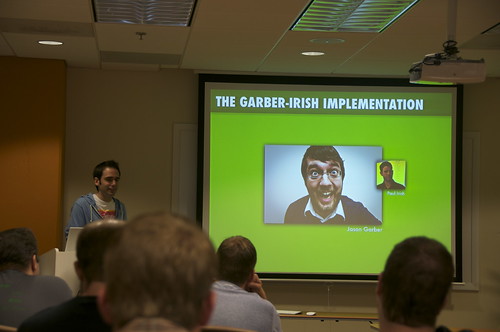
So Blake Waters presented this topic in August this year.
And now Jason has published his approach on the most excellent Viget Inspire blog. Please check it out.
It's essentially using data-attributes instead of classes to trigger this action.. So..
<body data-controller="users" data-action="show">Will fire off:
FOO.common.init(); FOO.users.init(); FOO.users.show();
Boom boom bam. I dig it. Check it out in its full glory.

Nice Paul, Just starting a greenfield app and have used a variation of this, rather than using body id and class I have used the rest url peices
e.g appName/Controller/Action – this provides me with common (appName), then more specific implementations using controller and finally the action. Seems to be working good although only a few hours into it. I hope this will spare the developers having to remember to specify body id and class. Any thoughts / issues with this?
@redsquare,
Ah that's pretty nice. I would only go that route if you're confident the URL structure doesn't need to change and you don't have any SEO needs out of the site.
This is an excellent solution. Just tested out on one current project and the application feels much smoother
Great idea! I can't believe I haven't thought of this previously. :)
I believe I got here from html5boilerplate.com so sorry if I'm more than a year late.
–
Well, I like this but you can do the same without the whole UTIL object if you're already using jQuery and if performance aren't really a problem.
I'm using this at the moment:
@Bfred
The classes part is where your code breaks down.. Not to mention this anti-DRY code is gonna get really hairy as this file grows..
But sure.. it's possible to do it this way.. sorta. kinda. :/
Hi, a simple question Paul
Should be any difference between this:
and this way I often see:
Thanks
@David
The only different is the latter will go to 'init' if funcname is also
false,0, and most importantly,''(empty string).Your call if that's okay or not.
I don't understand what you gain by triggering the modules (e.g. shopping) with the body tag class. Isn't that conflating style and functionality? I mean, you might want a global shopping class, but then again you might not. Why not just stay in javascript and register the modules explicitly?
@A Lisman, no, not at all. Markup describes the content of the page. Clearly the content of the page very much has to do with shopping and the cart. Those classes may be used for styling (that would be wise, certainly), but don't need to.
Not exactly sure how you're proposing to "register the modules explicitly" but I'm not thinking of a possible implementation where that would be either performant or violate separation of behavior/content much worse.
The advantage here is that we have complete control over what part of our app runs based on the current page.
Kind of like Sammy.js's route-specific callbacks.
How do you handle partial updates, via XHR, in your app though? This application model only covers site-loading.
And just 2c from the JS smart-ass ;)
would be better and easier with:
With type-converting equality comparison (===) Null and Undefined are equal, what your code probably wants to check. Even cleaner would be to check for a String-type.
p.s. and why would you reassign funcname with itself for most cases? Using if seems longer than the conditional operator but will result in the same amount of (better readable) code.
my approach is a bit different. i use page IDs defined via server-side script to load specific page assets.
first i setup a page ID for every page in the controller or on the head of the document:
then use these IDs to load the asset for each page:
it's very crude. but it does work well for me to split up assets for a large application.
Hey Paul,
what are the args used for? It seems to work without them at first sight.
Regards,
Tom
@Thomas Horster
Yeah works totally fine without them…
I just like it as a point of extension.. in case you want to do a :
or something a little weird like that.
Awesome solution!
Do you have any ideas how to make it so a method doesn't have to be created for each page?
I'm using it on a site with a large number of pages. Not every page requires page-specific JavaScript, so it would be nice to only create methods for pages that need them.
@Jeff
A method doesn't have to be created for each. The script is smart enough to not error if you didnt make one it's all good.
@Daniel15
Yeah wow, why didn't you think of the wheel or the light bulb. Idiot!
Sometimes when people far smarter than me come up with stuff like this, I look at my cobbled-together server-side solution (translating server variables to JS variables before sending the page, etc) and think, "meh, it works."
Other times, I read it twice, thrice, fourthce… and although I'm still not totally sussing the whole thing yet, the light starts to come on and I look at my cobbled-together server-side solution and think, "This has got to go!" This is one such time. At your suggestion, going to check out Blake waters as well. I sense an improvement in both my abilities and my application coming on…
I've been using this technique almost since Mr. Irish published it. Really helps in keeping the code tidy and organized.
Also, it pays off to have the functions stored in an object literal, as you can access them via the console, or re-trigger them, for example, if you need to run the same code in a few different sections, you can declare them for one section and then, trigger them on other sections too.
Is there a better/more-correct way to do the following?
That is, if I want sectionB.init to do/be the same as sectionA.init.
Above, I'm just firing the sectionA function using the UTIL.fire method.
But… is there a way that I could "assign" sectionA.init to sectionB.init when creating the object literal? (like if I were assigning a value to a variable using "sectionB.init = sectionA.init")
Sorry if I'm making nonsense :)
I enjoy using this technique in projects, but sometimes the larger ones can get a little hard to manage (especially if multiple devs are accessing the file and making changes at once.)
With that in mind, I just created (literally) a project that takes this concept, and allows you to organize the code into a directory structure: https://github.com/cmawhorter/CJS
It provides a jit.php file which will then turn your broken-out structure back into a single file.
The code is untested, and stands as a POC as of right now, but it's pretty simple, so I'd be surprised if you couldn't use it as-is right now. Feedback welcome.
I'm still not totally sussing the whole thing yet, the light starts to come on and I look at my cobbled-together server-side solution! Great post!
Is there an official name for this pattern/technique. I like it, and use it. But what should it be referred to as?
I like this method but I prefer to output the layout name im using rather than the controller's name.
Is it too clever or too dumb to add a some $(window).load(function(){…code…}); inside common.finalize?
I'm thinking of this, for example:
@Julián Landerreche
Not incorrect, but this may not be a wise idea in context of the page load times. Reasons –
a) Browser will have to request, download and parse your script.js file entirely before it runs it, finds another external script call, and starts requesting that. It's better to put external script calls directly into the markup. Explanation
b) Even if you go ahead with this, it might be a good idea to place the js element after the body content, not in the head. Explanation