Home > javascript > log() – A lightweight wrapper for console.log

log() – A lightweight wrapper for console.log

There are a few things that a console.log wrapper can and should do:

  • Prevent errors if a console isn't around (i.e. IE)
  • Maintain a history of logs, so you can look in the past if your console is added afterwards (e.g. firebug lite)
  • Normalize the browser differences in console integration (e.g. when passing multiple arguments into console.log())
  • For something you type regularly, make it quicker to type for the lazy among us.

But there are a few considerations…

Console.log.apply doesn't handle multiple arguments in Safari 3 or Chrome 1.1

Firebug, Chrome, and Safari have a clearer presentation for strings when inside an array:
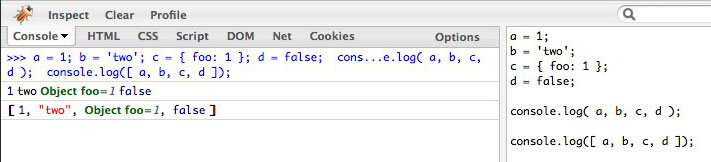
More details on how firebug and webkit inspector visually view these things here: http://gist.github.com/466188

Extra features

  • A reverse-chronological history, accessible as an array at log.history
  • I have also included (I removed it) a shorthand logargs() function that is useful when you're inside a function and want to know the context and arguments passed in. I use it a lot in ajax callbacks. Worth noting that it uses arguments.callee.caller, which will be deprecated in ECMAScript 5 Strict mode. :( I killed off logargs cuz nobody lurved it like I did. If you want it… pastie.org/1033665

The code:

// usage: log('inside coolFunc',this,arguments);
// http://paulirish.com/2009/log-a-lightweight-wrapper-for-consolelog/
window.log = function(){
  log.history = log.history || [];   // store logs to an array for reference
  log.history.push(arguments);
  if(this.console){
    console.log( Array.prototype.slice.call(arguments) );
  }
};

And if you'd like it minified:

window.log=function(){log.history=log.history||[];log.history.push(arguments);if(this.console){console.log(Array.prototype.slice.call(arguments))}};

Interestingly, the minified version of this script is smaller (262 148 bytes), and arguably more useful, than the minified firebugx.js, which I've covered before. Plus it has one more feature.

Plus Firebug lite?

You got it. This bookmarklet will add firebug lite, and then output the logged history when it's ready:
>>> Fbug Lite+log <<<

Want more power?

After writing this, I worked with Ben Alman on a more comprehensive and robust logging script. It's excellent if you take full advantage of the console API. And you should be aware that Safari 4 and Chrome 2 have most of that API supported. Make full use of it and don't you dare type another alert()!

2010.05.20: Updated log code. Fixed some edge case bugs.

2010.07.06: Updated code again. removed logargs. link to pretty viewings in the gist

2011.04.12: Craig Patik expanded the functionality of this in a lot of detail. Great post!

javascript

  1. June 9th, 2009 at 23:20 #1

    This code is public domain, btw.

  2. June 10th, 2009 at 08:49 #2

    Paul, using every minification technique I could think of, I came up with this:

     
    (function(){
      var log,
        history,
        window = this,
        con = window.console;
     
      window.log = log = function() {
        history.push( arguments );
     
        con && con.log[ con.firebug ? 
          'apply' : 'call']( con, Array.prototype.slice.call( arguments ) );
      };
     
      window.logargs = function( context ) {
        log( context, arguments.callee.caller.arguments );
      };
     
      log.history = history = [];
     
    })();
     
    // Minified, it's only 242 bytes, a nearly 8% savings in bandwidth!
     
    (function(){var b,d,c=this,a=c.console;c.log=b=function(){d.push(arguments);a&&a.log[a.firebug?"apply":"call"](a,Array.prototype.slice.call(arguments))};c.logargs=function(e){b(e,arguments.callee.caller.arguments)};b.history=d=[]})();
  3. June 10th, 2009 at 08:51 #3

    How about submitting this to the Firebug/Firebug Lite projects so all can benefit? And submitting bugs in Chrome/WebKit/Firebug to fix the array wrapping issue?

  4. June 10th, 2009 at 08:56 #4

    @"Cowboy" Ben Alman, nice tricks. Thx!

  5. November 1st, 2009 at 22:36 #5

    Note that I've built this up quite a bit and posted it on my site:

    http://benalman.com/projects/javascript-debug-console-log/

  6. Sean
    September 17th, 2010 at 03:30 #6

    Paul,

    When I use your bookmarklet, I get the following error in firebug after it loads:

    "Script error. (,0)"

    ?

    Sean

  7. December 9th, 2010 at 20:18 #7

    A slight improvement, might be useful for some:

    window.log = function()
    {
        log.history = log.history || [];
        log.history.push(arguments);
        if (this.console)
        {
            if (arguments.length == 1)
            {
                console.debug(arguments[0]);
            }
            else
            {
                console.log( Array.prototype.slice.call(arguments) );
            }
        }
    };
  8. January 9th, 2011 at 21:36 #8

    Thanks Paul! I've done something simliar, it doesn't do history, so it's not as useful for actually debugging in IE with firebug lite. It's just a super tiny (52 bytes) snippet that lets you leave console.log statements in your code and not worry about breaking IE or FF. So in case it's useful to anyone:

    window.console||(window.console={log:function(){}});

    I also made two other, still very small, snippets that do the same thing for the other various console methods (255 and 130 bytes depending on which).

    That little project lives here if anyone cares:
    https://github.com/andyet/ConsoleDummy.js

    Cheers! View Source 4eva!!!

  9. February 8th, 2011 at 17:59 #9

    I've run into a scenario where using log() and alert() on a new empty object at the same time yield different results. Alert properly shows that the object is in fact empty while log is showing that it has been modified.

    A reference to the object is later passed to another method which modifies it. Whats strange is that log seems to be delayed and is outputting the object in its altered state, even though log is called first. I managed to get around this by cloning the data object and passing the clone to my other method instead.

    Have you run into this?

  10. April 26th, 2011 at 17:02 #10

    Your wrap does not make

    log('%d test,123);

    acts the same as

    console.log('%d test', 123);

    in chrome?
    If I want to make it acts the same how could I do?

  11. April 23rd, 2012 at 01:17 #11

    "Make full use of it and don't you dare type another alert()!"
    So true, that made me laugh :)

    I wrote a similar lightweight wrapper without a history, and you can force an alert() message if you are debugging in a browser without a console:

    var log = function(msg, force) {
        force ? alert(msg) : (console &amp;&amp; console.log ? console.log(msg) : null);
    };

    If anyone is interested, heres the article:
    http://www.htmltweaks.com/Debugging_JavaScript_with_the_Console

  1. August 13th, 2009 at 19:32 | #1
  2. January 30th, 2010 at 21:46 | #2
  3. October 1st, 2010 at 05:54 | #3
  4. March 25th, 2011 at 02:21 | #4
  5. April 12th, 2011 at 15:32 | #5
  6. April 28th, 2011 at 14:59 | #6
  7. May 21st, 2011 at 17:22 | #7
  8. January 4th, 2012 at 00:54 | #8

For code blocks, use <pre lang="javascript">. css and html4strict are also accepted.