Home > front-end development, typography > Chrome and @font-face: It's here!

Chrome and @font-face: It's here!

September 25th, 2009
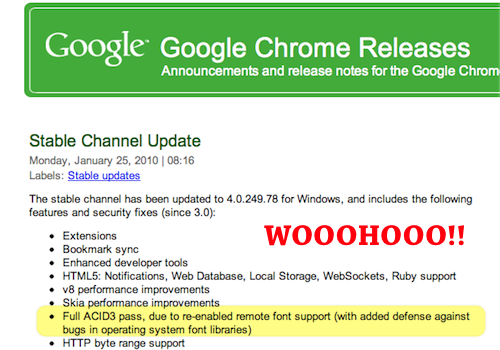
January 25, 2010: It is now in the stable Chrome release! The wait is over, everyone. :) [release notes]

Today, Zeldman issued an ultimatum that we've all been feeling recently:
Chrome needs to support @font-face immediately.

It's true, every major browser supports @font-face:

  • Internet Explorer: since IE5
  • Firefox: since FF3.5
  • Safari: since Safari 3.2
  • Opera: since Opera 10

But..
Google Chrome currently does not enable @font-face linking to ttf and otf.

It actually does support SVG fonts in a @font-face declaration. View this demo in Chrome or Chromium to see svg fonts in action. Divya has some great research around fonts and SVG if you're interested in more.

You can turn it on, at will

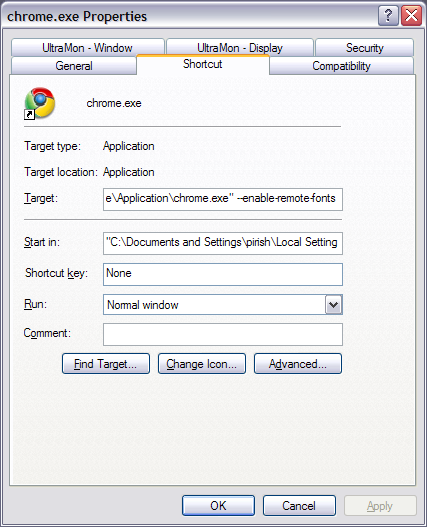
You can enable web fonts with an executable switch: −−enable-remote-fonts.

On Windows, you can tweak the shortcut path, like so.
With Chromium on OS X, you use Terminal to launch:
/Applications/Chromium.app/Contents/MacOS/Chromium --enable-remote-fonts

With proper Google Chrome on OS X, you need to escape the spaces:

/Applications/Google\ Chrome.app/Contents/MacOS/Google\ Chrome --enable-remote-fonts

With Chromium on Linux[1]:

chromium-browser --enable-plugins --enable-remote-fonts %U

Once you enable it, all @font-face stuff works just as you'd expect, including the bulletproof @font-face syntax [demo] and the Nice Web Type demos.

But we need web fonts working by default

Wait, so why is this wonderful feature disabled by default? Security review. Ian Fette, the program manager of Chrome, indicated that they need to explore how do webfonts in a "reasonably safe manner". So that's the holdup.
This ticket on the Chromium bug tracker tracks the feature being enabled by default.

Okay, so when do we get our toy? Soon, in fact!

Chrome is my default browser, so my patience on this issue ran dry recently. I emailed Takuya, an engineer at Google Japan, who is working on this and he said:

We are almost done. The code is under review internally within Google. I'm expecting to make it public no later than a week or so.

So I expect we'll be seeing @font-face support enabled by default in the Chrome dev builds soon. Based on their release schedule I think it'll be near the end of the year when we see it in Chrome stable. That's good news; let's hope we see it sooner.

2009.10.19 : The ticket tracking @font-face on by default gained the Milestone-4 label, indicating it will be included in Chrome 4 Stable.

2009.11.04: The Chromium team has released ots – an OpenType sanitizer library meant to clean any security concerns from a font file included via @font-face. They have also filed a bug upstream with WebKit to integrate this code at the Webkit level. Finally we see the fruit of their security review.

2009.11.18: Remote fonts are now enabled by default!!! This should only be in the dev builds for now. I'll update when it makes it to beta builds and eventually the stable. But right now it still looks like we'll see this in version 4 stable. (Nov 21: confirmed its in dev builds.. starting with version 4.0.249.4 [blog post], [rev 32300])

2009.12.09: @font-face support is now in the Chrome Beta of both Windows and Mac.

2010.01.25: @font-face support is now in the Windows Chrome Stable release! [release notes]

Paul Irish front-end development, typography

  1. September 25th, 2009 at 12:47 #1

    Oh, and Chrome Frame:

    Currently @font-face doesn't work in Chrome Frame, and I know no way to enable it, as you can't really pass an executable switch to a Browser Helper Object.

    So using Chrome Frame means you won't get any rich type with @font-face, which sucks. However it's still beta, and I believe it's using the dev branch of Chrome, so when @font-face support makes its way into the dev branch, I think we'll see it in Chrome Frame soon.

  2. September 25th, 2009 at 14:53 #2

    That is good news, indeed. The web has every right to be as font-rich as traditional media. Just gotta convince the foundries of that.

    I know Safari 4 supports @font-face, but what's the status of iPhone Safari? Are we just using Cufón for mobile?

    It often seems there's a disconnect when people plan for the future. You hear "The future of the web will have…" and "Mobile is where the web is going", but the two hardly ever line up.

  3. D Ross
    September 25th, 2009 at 21:17 #3

    @Russell Uresti
    Russell, you're trying to sound like you know more than you really do.

  4. September 26th, 2009 at 16:13 #4

    With all due respect to Google, I don't believe @font-face is a security issue. That doesn't make any sense. Safari is a Webkit browser and it's had @font-face support for two years.
    My bullshit alarm is going off.
    I believe it's a legal issue.
    Chrome Frame is a very bold back-door assault on MSFT. And Google knows perfectly well how MSFT feels about their investment in fonts and their opposition to linking to "raw" font files. If Chrome Frame were to circumvent that, it might just be the straw that breaks the camel's back.
    I think they are gauging Microsoft's reaction before proceeding further.

    Just my 2 cents.

  5. September 28th, 2009 at 21:57 #5

    @Richard Fink
    I think you're reading a little too far into the 'security issue' comments. Remember, even full Chrome (which really has nothing to do with Microsoft) doesn't have @font-face enabled by default, not just Chrome Frame.

  6. October 20th, 2009 at 14:10 #6

    Why?! It exists typekit and I can't see their great fonts because of this on chromium! :-/

  7. October 26th, 2009 at 16:16 #7

    Am I using some kind of magic version of Chrome 3.0?
    @font-face works just fine for me. Not sure if it's grabbing EOT or TTF, but then again IE doesn't support TTF as far as I know.

  8. Peter
    December 9th, 2009 at 08:38 #8

    This is strange, but chrome 4.0.249.22 on Linux actually freezes at any typekit site that I can find, just stalls out and sits there. Not sure where I can register this as a bug, pointers welcome.

  9. December 10th, 2009 at 21:00 #9

    @Peter
    I'd file it on their get satisfaction support site: http://getsatisfaction.com/typekit

  10. February 14th, 2010 at 03:36 #10

    So Chrome has web fonts now but the implementation is buggy. See http://soukie.net. Firefox and Safari render italics correctly but Chrome does not. Not sure if they have a bug tracking somewhere.

  11. February 14th, 2010 at 11:53 #11

    @Pavel Soukenik
    It'd be awesome if you made a test case and filed a ticket for it:
    http://code.google.com/p/chromium/issues/list

  12. February 14th, 2010 at 16:23 #12

    @Paul Irish, done. I have filed the bug #35739. (And also #35737 which is coming from webkit but nobody has reacted to my report in Bugzilla since September.)

  13. Jasim
    February 19th, 2010 at 01:43 #13

    Hi paul,

    Google chrome supports @fontface for many english font types..
    like http://www.fontsquirrel.com/fontfacedemo/Cloister-Black

    but for language malayalam it doesn't seem to download ttf files :(.. look @ the site http://www.mathrubhumi.com/ it renders perfectly with firefox and IE with webfonts. but fails in Chrome. Do u have any solutions?

  14. anon
    May 15th, 2010 at 09:45 #14

    just wanna say that the first time you load a page with @font-face it doesn't work (otf)
    f5 > start working

    on chrome 5.0.375.23

  15. June 25th, 2010 at 17:03 #15

    Chrome supports WOFF fonts as of 5.0.396.0, which should be released to Beta Channel soon.
    http://googlechromereleases.blogspot.com/2010/05/dev-channel-update.html

  16. December 21st, 2010 at 23:11 #16

    I'm finding that some very normal ttf fonts don't work either. For instance if you are using Reprise Stamp, you only get the first couple words.

    This is latest chrome build as of 12/21/2010.

  17. December 24th, 2010 at 11:34 #17

    @Zach Baker
    Actually Paul has pointed out that Chrome is rather particular – "secure" – with fonts. Seems that if the font tables have any corruption it bales out. I have tried a few fonts so far, none of which are working quite right in Chrome, but am hopeful to find something that looks decent and works in Chrome.

  18. January 12th, 2011 at 19:45 #18

    @Zach Baker

    Actually Chrome support for this seems to really stink. I have tried a dozen different fonts now, none of which work correctly. Each and every one of them faults at certain character[s] in the font file.

    It stinks to find some really nice looking stylistic font and not be able to use it, settling for another….10 times over…lame.

  19. January 12th, 2011 at 20:32 #19

    FF4 implements OTS as well so it probably fails there as well.
    I don't know what fonts you're using but you should shoot them through the font squirrel generator first.. That might smooth out the font tables that are seemingly troublesome.

  1. October 3rd, 2009 at 12:22 | #1
  2. October 13th, 2009 at 09:37 | #2
  3. October 19th, 2009 at 21:18 | #3
  4. December 5th, 2009 at 02:56 | #4
  5. December 19th, 2009 at 17:13 | #5
  6. November 5th, 2010 at 09:47 | #6
  7. January 15th, 2011 at 21:19 | #7
  8. September 19th, 2011 at 21:41 | #8

For code blocks, use <pre lang="javascript">. css and html4strict are also accepted.

i left this space here for you to play. <3