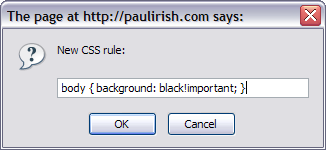
Bookmarklet: Inject new css rules

I love doing as much CSS debugging as I can without hitting reload. (see also: my 'refresh css' bookmarklet)

newcssrule.PNGFirebug can get you a far way in playing with styles. You can edit current css rules and add new styles to a given element, but there is no way to add a brand new rule to the page. UNTIL NOW!!!

Drag this bad boy to your bookmark bar:

>>> newcssrule <<<

The code is obviously trivial, but it's a helpful button to have around sometimes. Plus you can then edit those rules in firebug immediately.

Update (2008.06.05): I should point out this code only works in Firefox (maybe Opera), but for full compatibility, understand the landscape at InstallStyles on Google Doctype.
And this code should get you started:

    function addCSS(newcss){
        if ($.browser.msie) {
            document.createStyleSheet().cssText = newcss;
        } else {
            var tag = document.createElement('style'); tag.type = 'text/css'; document.getElementsByTagName('head')[0].appendChild(tag); 
            tag[ $.browser.safari ? 'innerText' : 'innerHTML'] = newcss;    
        }
    }

4 comments ↓

#1 Kyle on 05.15.08 at 9:32 pm

nice nice. I shuddered when I read your post because I was at battle today w/ a bookmarklet that I'm currently working on.

They can be a real pain in the ass.

#2 Paul Irish on 05.15.08 at 10:49 pm

Indeed. I basically test things out in firebug console.. Make sure it works.. then wrap it in some

(function(){
  // happy self executing anonymous function
  // to keep everything out of the global scope.
})();

Then use packer to minify it. and add javascript: in the front. Voila!

#3 heather on 05.20.08 at 11:14 am

oh that is handy!

to add CSS classes, i usually select an element in the left inspection area- then right click on the white space in the right CSS editing area and click 'Edit Element Style'...

it works but your bookmarklet is much easier.

thanks!

#4 Paul Irish on 05.20.08 at 11:17 am

Ah. I do that too many times, but sometimes I want a rule for ALL occurences of a class or something. When its not just limited to a singluar element. :)

Leave a Comment

Basic HTML is cool. Surround code blocks with <pre lang="javascript"></pre>.